Category Archives: Radio

Iran Protests: The Importance of a Shortwave Radio

I know that this site has at least one follower in Iran.  But I’m certain that they are not following us at the moment, because the government of Iran shut down the internet.  International telephone service has also been cut.  When things settle down, they’ll be back, and they can know that they were in our prayers.  But since they obviously have an interest in radio, we hope that they are getting news from the outside world via radio.

If they have Starlink, they can use that.  But it’s unlikely that most people have the hardware just sitting around, since it’s expensive.  And it’s probably illegal.   Satellite TV is apparently popular, but it’s also illegal.  And if the revolutionary guards are running around shooting people, you probably don’t want to have an illegal satellite dish visible on your balcony.

Once again, we are reminded the importance of having even a very inexpensive shortwave or even mediumwave (AM) receiver.  With it, even if due to circumstances outside of your control cause you to lose contact with the outside world, you can still keep yourself informed.

To get some idea of what you would be able to hear on a radio in Iran, I went to one of the closest WebSDR’s I could find, a remote receiver in Kuwait.  The medium wave stations would be different from the ones I would hear in Iran, but the shortwave band would sound about the same.  There were dozens of signals available.  Most were in local languages, but I did hear French, and at least one English station, Radio China International on 9600 kHz.

Undoubtedly, many of the signals I was hearing were in Farsi or Arabic, meaning that local listeners would be able to get news from the outside world, such as from the BBC Persian service from transmitters in Cyprus, Rwanda, and Oman.  During normal times, having an FM receiver is also a good thing.  But in this case, unless you were close enough to a border to hear foreign stations, it wouldn’t provide much useful information.

You needn’t spend a lot of money on a shortwave radio.  And even during normal times, a portable AM/FM radio (since the inexpensive shortwave sets also get AM and FM) can come in handy.

This link will take you to the Amazon search results for inexpensive shortwave radios.  The list is sorted by price, and also includes only products with free shipping available.  So if you have Prime, you pay no shipping.  If you don’t have Prime, then add some items to your order to bring it up to $35.  (My favorites in this category are toilet paper, coffee, or canned goods.)  As you can see, prices start for under $10.  I don’t have experience with these particular models, since they come and go.  But my experience is that most of these cheap receivers perform very well on FM, serve the purpose on AM, and will pull in at least a few strong shortwave stations.

Looking at the reviews, it appears that this one performs adequately, and would get at least some shortwave stations, although the small dial makes it tricky to tune.  It requires AA batteries, so be sure to stock up on them as well.    This one is slightly larger, meaning that it’s easier to tune.  It has a built-in rechargeable battery which charges from a USB.  (See our earlier post on preparing for power outages to make sure you’re prepared to recharge it in an emergency.)

For most of our readers, it’s very unlikely that your government will intentionally put you in the dark.  But even in circumstances as mundane as a power outage, it’s good to know that you can find out what’s going on in the world.  And the price for making this preparation is close to zero.

آزادی، آزادی، آزادی


Some links on this site are affiliate links, meaning that this site earns a small commission if you make a purchase after using the link.

POTA/WWFF Activation, Adams Homestead and Nature Preserve, SD

This morning, I did a Parks On The Air (POTA) and World Wide Flora and Fauna (WWFF) activation of Adams Homestead and Nature Preserve,  a state park in North Sioux City, South Dakota.  I was returning home after presenting a Continuing Legal Education program in neighboring Sioux City, Iowa,  The most direct route home would have kept me in Iowa, but I couldn’t resist adding a few miles to my drive and activating a park in the “rare” state of South Dakota.

The 1500-acre park along the Missouri River contains about 10 miles of trails, as well as an archery range.  It also features a number of historic buildings, including the original homestead, other cabins, a church and a school.  Admission is free.   Most of the buildings and visitor center are closed on weekends, but the grounds are fully accessible.

I started on 15 meters, which sounded relatively quiet, so I quickly switched to 20 meters.  FT8 results weren’t very promising, with only one QSO.

Since CW gets through no matter what, I switched to 20 CW, where I made 20 contacts over the course of an hour.  My best DX was NL7V in Alaska, who pulled my QRP signal out of the noise and gave me a 229 report.  I made a number of Park-to-Park (P2P) contacts, including KD8DEU, who was coincidentally just down the Missouri River from me at Blanchette Landing Access State Conservation Area in Missouri.

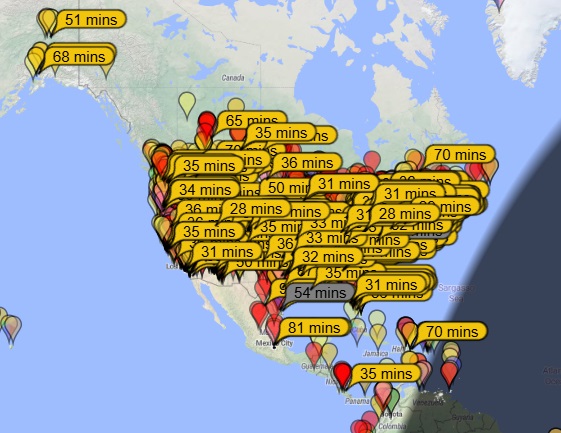
I was operating from my car, with my zBitX, with a Hamstick on the car.  As you can see from the maps below, I was getting out on both FT8 and CW.  The FT8 map from PSK Reporter has fewer spots than I would have expected, whereas the CW map from Reverse Beacon Network is pretty typical.

FT8 Signal Reports from PSK Reporter

CW Spots from ReverseBeacon.net.


1950 (and 2025) Five-Tube Backpacking QRP Transceiver

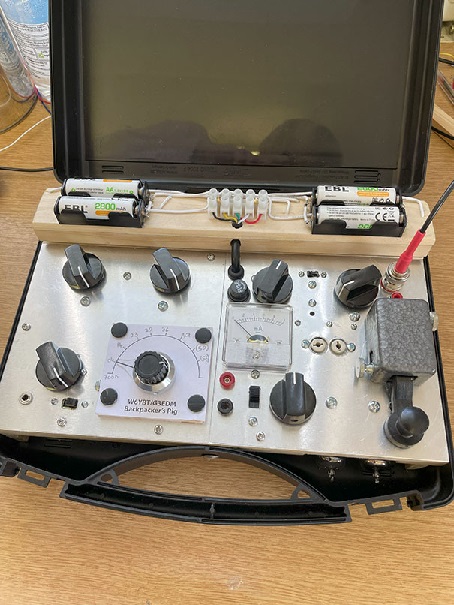
2025 G3EDM version. G3EDM photo.

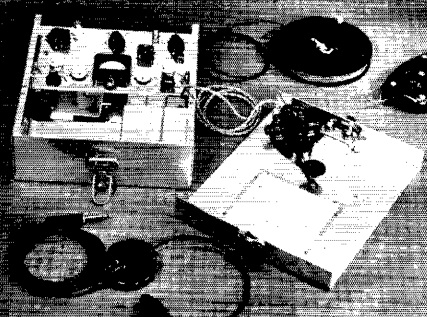
1950 W6YBT version.

Seventy-five years ago this month, the September 1950 issue of QST carried a construction article by Robert Vreeland, W6YBT, for the “Mountaineer”, a QRP transceiver designed by Vreeland for hiking treks in the California Sierras. He notes that while most hikers would argue against the added weight of even the smallest radio unit, hams were a different breed. Few hams would contemplate a vacation trek without bringing along some kind of radio gear, and the Mountaineer was his answer to the problem of how to explore nature while still staying on the air.

His design was for a single band, and he settled on 80 meters, although he recognized that 40 might be better for use during the day. When finished, his rig was useful for contacts of up to 20 miles during the day and 250 miles at night. The final design was a two-tube crystal controlled transmitter, with a 1U4 serving as oscillator and 3A4 amplifying with 2 watts input power.

The superheterodyne receiver consisted of three tubes, a 1R5 converter, 1U4 regenerative detector, and another 1U4 audio amplifier to drive the headphones. It shared the transmitter’s tank circuit as the input of the receiver and used a crystal-controlled local oscillator. Tuning was done in the detector, with each crystal covering about 120 kHz.

The rig’s enclosure provided space for extra tubes, fuses, and dial light. The author noted that since nights could be chilly, the set was usually operated from a sleeping bag, with an antenna of up to half wavelength.

The set measured 3x8x9 inches, and weighed in at 9 pounds, complete with batteries.

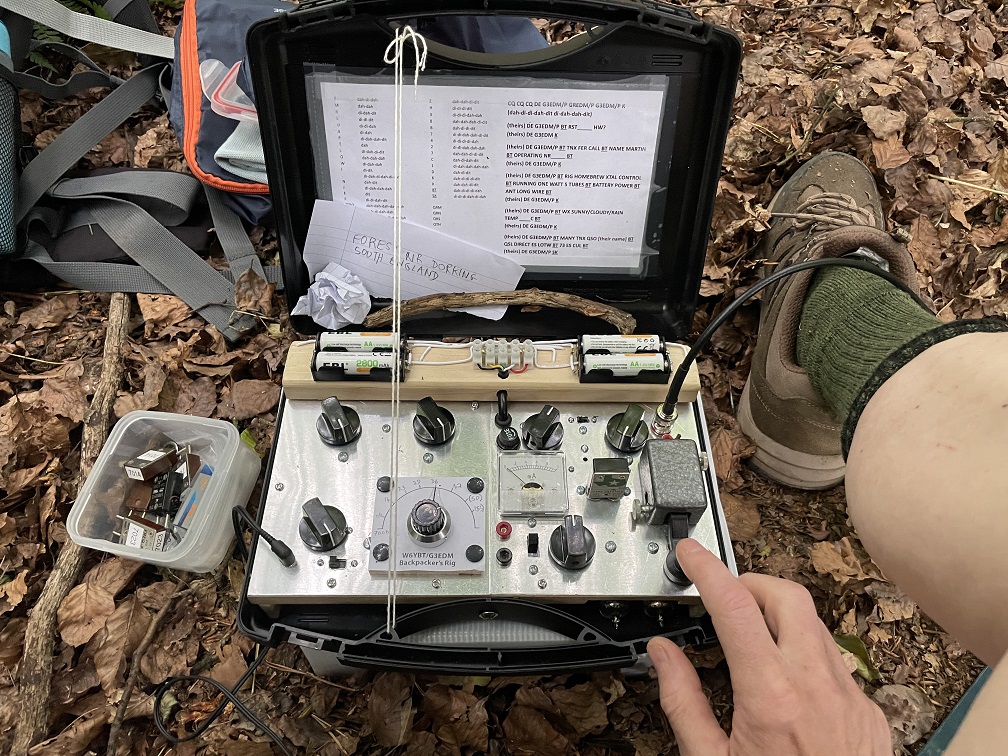
Unfortunately, we don’t have any photos of W6YBT operating his rig from a sleeping bag in the mountains, but we have even better! This year, 75 years after W6YBT first used the rig, Martin, G3EDM, was looking for a rig to take with him on a two-week 140 mile hike across England. And like W6YBT before him, going on vacation meant bringing along some kind of radio. According to an October 1993 article in 73 Magazine, W6YBT still just couldn’t leave ham radio at home, and eventually went solid state and got an MFJ-9020 QRP rig.

But G3EDM is our kind of person, and wanted to go “hollow state.” He eventually settled on the W6YBT design, with some modifications, and you can read his design notes at this thread on QRZ.com.

G3EDM at his operating position. G3EDM photo.

The color photo at the top of this page is not the 1950 version (for that we have only the grainy picture). It is actually the 2025 G3EDM version. There are some modifications. For example, the 2025 version is on 40 meters. Since most of the operating was to be done during the daylight hours, this was a better choice than 80. It also uses modern lithium batteries, which G3EDM was able to charge at night while lodging in hotels along his path.

He then outdid W6YBT (probably because we now have this internet thingie that makes it easy) by posting a detailed travelogue detailing his contacts at this thread.

He managed multiple contacts almost every day, usually set up outdoors, but sometimes from a hotel room. Most were to other stations in England, but he was spotted numerous times on the Reverse Beacon Network by stations in continental Europe. In fact, he copied a few stations in America who were trying to work him, and on a couple of occasions, his signal was heard across the Pond, although not strong enough for a complete QSO. The longest complete QSO was 430 miles to Scotland.

Martin’s complete travelogue thread is worth a read. Among other things, it does go to show that some of the old designs we feature here are not mere novelties–they really did work.  75 years ago, most people were unable to stay in touch with civilization while camped in the wilderness, but hams were able to.  It’s just as amazing that the same feat can be replicated today, not just with the ubiquitous cell phone, but with that same 75-year-old technology.


Easy HF Mobile Antenna

Now that I have my little zBitX transceiver, I’ve been trying it out during POTA activations. For Field Day, I set up a temporary dipole, but it’s always nice to be able to operate right from the car. In the past, I’ve used a trunk mount and a magnetic mount antenna. The trunk mount doesn’t fit very well on my car (a 2014 Dodge Journey), and the magnetic mount is old and in pretty bad shape.

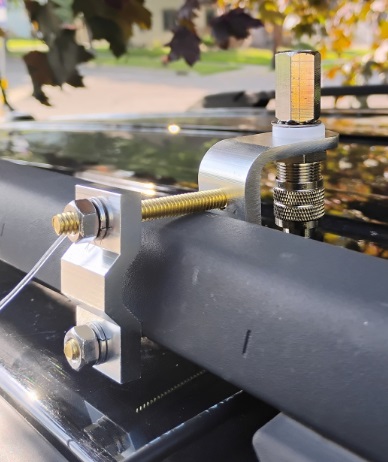
So I stopped at a truck stop on the way home from an activation and bought the mirror mount shown here. It fits (just barely) on the factory roof rack. I did have to make a run to the hardware store to replace the two bolts, as the ones provided weren’t quite long enough.  But it fits snugly and is secure.

As you can see, the coax connection just barely fits.  You do need to connect it before mounting the bracket.  I can use it with any of my Hamstick antennas, and today I tested it on 20 meters.

The mount that I purchased is Amarillo Supply Co. stock number 6163935, which is the store brand of Love’s Truck Stops, and you should be able to find it on the shelf at one of their locations.  Otherwise, it appears to be identical with this one at Amazon.

The purists will note that the rack appears to be made out of plastic, which is non-conductive.  So for a ground, I simply added a “radial” about 16 feet long.  You can see it attached to one of the bolts.  I ran that in the door, and around the molding of the rear door, out of sight.  Inside the car, also out of sight, it then goes to the front door, where it also runs around the molding.  I’ll probably add a couple more radials.

There are undoubtedly better ways to do it, but this provides an adequate ground.  I did another POTA activation today, and you can see that I was picked up on FT8 as far away as Costa Rica and Alaska.  And on CW, my signal was also picked up in the U.S. and Canada, as shown by the bottom map.


Some links on this site are affiliate links, meaning that this site earns a small commission if you make a purchase after using the link.

Weather Radios Save Lives!

Watch for Severe Weather While You Sleep.

The recent flooding in Texas should serve as a reminder that everyone should have a weather radio! In most cases, your cell phone provides accurate up-to-date weather information.  But it has limitations, particularly in an emergency.

It appears that many of the Texas victims were caught unaware of rising flood waters.  The flood happened at night, and even though the information was available on the phone, the victims were asleep and not looking at their phones.  In addition (especially at low-lying areas in a river valley), the phone might not have had service.

But a NOAA weather radio would have awakened sleeping victims, and given enough advance warning so that they could go to higher ground.

According to news accounts, the flood waters hit Camp Mystic at about 4:00 AM on July 4.  And according to news accounts, the first NOAA Weather broadcast would have been at 1:18 PM Thursday, when a flood watch was issued by the National Weather Service in San Antonio.  Since this was a watch, I don’t believe that it would have triggered an alarm from a weather radio.  But it would have been broadcast repeatedly during the day on NOAA Weather Radio, so someone tuning in to check the weather would have heard it.

At 11:41 PM, a Flash Flood Warning was issued for Bandera County, and would have set off the loud siren on any weather radio in the area.  That loud siren would have gone off again at 1:14 AM Friday, with a warning for Bandera and Kerr Counties.  This time, the message would have included that there would be “considerable” flooding.  More warnings continued through the morning hours.

If people had a NOAA Weather Radio, they would have been awakened by the loud siren.  (As we’ve reported earlier, add-ons are available to allow deaf people to be awakened by a weather emergency.)

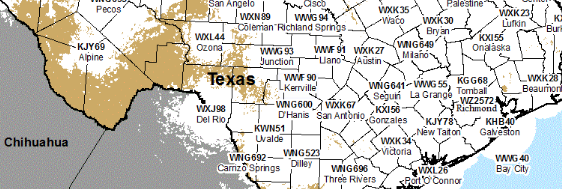
Unlike cell phone coverage, which can sometimes be spotty, the NOAA Weather Radio transmitters blanket most of the nation.  In the map above, white areas have coverage, and only the beige areas lack coverage.  In this case, transmitters in both San Antonio and Kerrville would have provided warnings.  You can find out if you have coverage at this interactive map.

There are three types of weather radios you can buy.  The cheapest option is a radio like this that allows you to listen to the 24 hour weather broadcast.   That can be very handy, but it doesn’t have an alarm, and it won’t wake you up if there’s a warning.

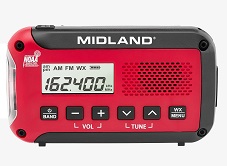
The best option is a weather radio similar to the one shown here, the Midland WR-120B.  If you ever want to hear the weather, you can push the button and you will hear it.  But more importantly, it sits silently until there is a warning.  At that time, it sets off a loud siren that will wake you.  This model has “SAME” encoding, meaning that you can program it in advance to hear warnings only in certain counties.  This is a useful feature, because it  prevents false alarms for warnings from neighboring counties.  But this feature is not essential.  For example, the radio I have does not have SAME encoding.  I find it useful to know what’s going on in neighboring counties.

This radio also runs off household current, meaning that you can just plug it in and forget it.  It does have battery backup in case the power goes out.

Another radio I own is the one shown at the left, the Midland ER-10VP.  It has a weather radio with the alert feature, so it will wake you up in the middle of the night.  It does not have SAME encoding, so you will hear warnings for neighboring counties.  It has a rechargeable battery, which can be charged from a USB charger just like your cell phone, or from solar or hand crank.  The battery power is both an advantage and disadvantage.  It will work even if the power goes out, but you do have to be mindful and keeping the battery charged.  If you are going to use it at home, I would recommend getting a USB charger and keeping it plugged in all the time.

The hand crank and solar charger could be handy in an emergency, since you can listen to the radio more or less indefinitely without external power.  But charging the battery with an external charger is much more convenient for daily use, especially if you use it for the alert feature and want to just plug it in and forget it.

The cost of these radios is so low that everyone should have one.  But this is particularly true if you are responsible for the safety of other people.  So if you are in charge of a school, a summer camp, or any other place where people gather, you really ought to have one of these.


Some links on this site are affiliate links, meaning that this site earns a small commission if you make a purchase after using the link.

HFSignals zBitX Transceiver Review


Bottom Line: This little rig is an exceptional value, but it does have lots of idiosyncrasies.

As I mentioned previously, I recently acquired a zBitX transceiver from HFSignals.com. It’s made in India, and you can have one for $200, which includes shipping.

The company is based in India, although they seem to be incorporated in Delaware, USA.  This little radio is popular, and there is a waiting list.  In my case, it took about four weeks to ship after my order.  Once it was shipped, it took less than a week to get here via DHL.  (Mine is number 4017.)

The radio is an exceptional value for the money, although it’s probably not a good choice for your first radio or only radio.  But even a few years ago, I never would have dreamed that I could have a complete HF station that fits in my pocket (albeit a rather large pocket).  It covers 80-10 meters, and will work CW, SSB, AM, FT8, and other digital modes.  What I find remarkable is that you can make FT8 contacts without any external hardware.

It’s perfect for activities such as Parks On The Air (POTA).  The image above is from Field Day, where over the course of about 2 hours, I worked about 20 contacts, most on CW, but one on SSB.  (I could have worked a lot more on CW if I hadn’t spent unfruitful time trying FT8).  As with most QRP activities, CW gets through a lot better than SSB.  If you’re planning on working SSB QRP (particularly when conditions aren’t great), it can be an exercise in frustration.  But the radio works on SSB, with the built-in microphone, and I’ve made two contacts, one on Field Day, and another during the West Virginia QSO Party.

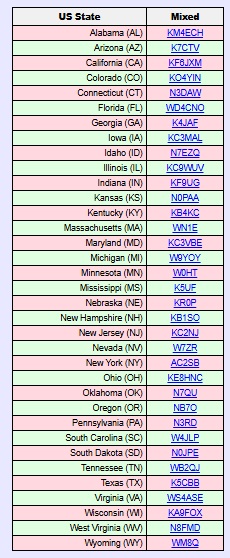
Within about three weeks, I worked 35 states, and my best confirmed DX is Italy.  I’ve used it mostly on FT8 and CW, although I have made those two SSB contacts (from Minnesota to West Virginia and New Hampshire).  I don’t have an external microphone, so I just talk into the radio.  The built-in microphone is at the upper left corner of the radio.

On the left is a list of states that I have confirmed so far, and at the right is a typical display from PSK Reporter showing where my signal was being picked up from my home.

The radio has only one knob, along with a touchscreen.  It came with a fine-point stylus, which is extremely useful.  You can use the type of stylus that you might normally use with your phone, although the fine point is helpful.  Theoretically, it would work with your fingers, but that would be extremely difficult, given the small size of the screen and the large size of most hams’ fingers.
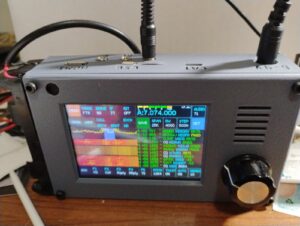
zBitX in operation at W0IS.

zBitX in operation at W0IS.

Basically, you tap on the portion of the screen you want to change, and then use the knob to change it.  So if you want to change frequency, you tap on the frequency, and start spinning the knob.  It does take a little getting used to.  For example, before turning the knob, you might need to adjust the steps, which can be from 10 Hz to 10 kHz.  So to quickly change frequency, you can set the stop to 10 kHz, and quickly go from one end of the band to the other.  The most convenient setting overall is 500 Hz.  To change the step, you click on that field, and then use the knob.  But you need to remember to click again on the frequency display.  So many times, I change the step, but forget to tap the frequency.  So when I spin the knob, only the step changes.

General Coverage Receiver

The receiver covers 500 kHz to 30 MHz, and as far as I can tell, it will transmit wherever it receives.  So you do need to be careful to stay inside the band.  The limited testing I’ve done shown that it performs reasonably well as a receiver, so if you need to listen to the AM radio, the shortwave broadcast bands, or WWV, it will be adequate, although probably not a stellar performer.  But one catch is that changing frequency can take a lot of time.

For example, if you want to listen to the AM broadcast band, you need to tune to the closest ham band, 80 meters.  Then, you need to set the tuning step to 10 kHz, and start spinning the dial to get from 3500 kHz down to the top of the AM band at 1700 kHz.  But you probably didn’t buy the radio to listen to AM, so that shouldn’t be a major concern.

Lack of Power Switch

One quirk about the radio is that it doesn’t have any kind of power switch.  To turn it off, you simply pull the power plug.  That isn’t a concern for a radio, but the computer purists out there will note that it’s not a good idea to simply cut the power to a computer.  And the zBitX is mostly a computer (a Raspberry Pi) with enough additional components to make it send and receive radio waves.  So it’s probably not the greatest way of doing things, but it seems to work.  Every time I’ve plugged the power back in, it comes back to life (after almost a minute of booting up).  When powered off, the radio maintains memory of the logbook, as well as your call, grid square, and settings.  On one occasion, my call sign and grid disappeared when I powered the radio back up.  I assume this is the result of the power-off sequence (or the lack of one).  But other than that, I haven’t experienced any problems.

Power Supply

The radio comes with a built-in battery holder on the side designed to hold two 18650 Li-ion batteries.  I ordered this four pack, which includes a charger, placing the order before the radio came.  It turns out 18650 batteries come in two forms:  a “flat-top” and a “button-top.”  The button-top looks kind of like a AA cell, in that the positive end has a little bump.  the flat-top is flat on both sides.  It turns out that, had I read the instructions, the flat-top was called for, and I ordered the wrong ones.  However, the button-tops worked just fine, although it’s a bit of a tight fit.

The button-top actually has an advantage, since it’s obvious which side is positive.  One thing you never want to do on this rig is hook the power supply up backwards.  Apparently, there’s a diode in the circuit to protect against this.  But there’s no fuse, so a trace on the circuit board leading to that diode is what would get fried.  The takeaway is that you never, never, want to get the polarity wrong!  When you’re putting in batteries, check and double check.

In retrospect, I’m not sure if I would have bought these batteries.  They last for about one hour of normal operation.  Not only are you running the transmitter, but the internal computer is powered up the full time.  Having built-in batteries is somewhat satisfying, since you have essentially a handie-talkie for 80 through 10 meters.  But it’s much more practical to run the radio from an external power supply.  In my case, I use my lead-acid fish finder battery, which allows operation for longer than I ever need it.  But the radio does not operate directly off 12 volts.  Instead, it’s set up for 6-9 volts.  Apparently, it will work with 12 volts, but it’s not advised, because it will stress the voltage regulators inside.  The radio gets very hot as it is, and it’s probably not a good idea to add to this.
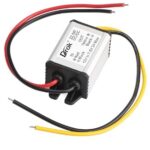
The power supply I'm using.

The power supply I’m using.

So to power the radio, I ordered this inexpensive buck converter, which drops the 12 volts to 7.5 volts.  Edit:  That one is now out of stock, but this one is equivalent.  The power connector on the radio is a 5.5 x 2.1 mm coaxial connector, and I ordered this cable to hook to the converter.  Rounding out the installation, I ordered this 12 volt cigarette lighter cord to connect to the input of the converter.  Once I had this set up, I haven’t used the built-in batteries, although I guess that option is good to have.  But some users might want to make the radio look a little more sleek by removing the battery holder.

Yes, the Receiver Picks up Noise from the Computer.

Other reviewers have noted that the receiver is subject to some noise from the computer (or quite likely, from the display).  This does seem to be true.  I haven’t done any extensive testing, but the receiver seems to be less sensitive than other receivers, probably for this reason.  But for a QRP rig, the receiver seems to be more than adequate.

In fact, the display noise is a bit of a feature, rather than a bug.  When I select something on the touch screen, I can hear it ever so slightly in the receiver audio.  So you get an audible confirmation that you touched the button.

Yes, the Radio Gets Hot.

As noted above, the radio goes through a set of batteries quite fast, and part of the reason is that it’s generating a lot of heat.  This seems particularly true when operating FT8, since it’s transmitting 100% power 50% of the time.  But even on other modes, the radio gets warm.  Some users have come up with various heat sinks, although I haven’t bothered.  I have noticed that if you set the radio vertically, it doesn’t get as warm.  If it’s laying flat, the back gets very warm, and having a little bit of airflow seems to make a big difference.

If you’ve ever had a long ragchew with a 2 meter handheld running 5 watts, you might notice that it also gets warm.  While it’s noticeable with the zBitX, I don’t consider it troubling.

What You’ll Need to Get Started
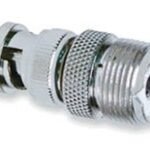
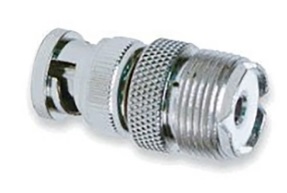
I ordered the batteries while the radio was still on the way, and I was able to get the radio on the air as soon as it arrived.  The antenna connection is a BNC connector, so if your antenna has a PL-259, you’ll need this adapter.

As long as you have batteries and a way to hook up an antenna, you can get on the air immediately on FT8, CW, or SSB.  (Of course, unless you plan on using the CW keyboard, you’ll need a set of paddles.)  However, to unlock other features, you’ll need to use, at least temporarily, an HDMI monitor, a keyboard, and a mouse.  Surely, you can find those in your junkbox, but if not, the preceding links are to cheap but perfectly adequate versions at Amazon.
The radio has a mini-HDMI socket for the monitor, so if you already have an HDMI cable lying around, you will need this adapter.  If you don’t have a cable, you can order this one.

To plug in the mouse and keyboard, the radio has a USB-C connector.  The radio comes with an adapter from USB-C to USB.  (Apparently, some recent purchasers didn’t get that adapter, so you might want to get one on Amazon.)  But there’s only one socket on the radio, so you’ll need a USB splitter to hook them up at the same time.  I suspect that you could get along without this, because I think you could use the mouse, click where you need to, and then plug in the keyboard.

Operating Without Display, Keyboard, and Mouse

As noted above, the external devices are not necessary to get on the air.  If you’re like me, you can be on the air as soon as the radio arrives, as long as you have power and an antenna.  You can use CW right away.  A set of paddles is best, but you could do it with the on-screen keyboard and macros.  FT8 requires no external hardware, and you can use SSB with the built-in microphone.

But there are a couple of setup tasks that are helpful and require connections to the external components.  First of all, you will eventually need to set the time in the zBitX.  This is done over the Internet.  The radio comes pre-set from the factory, and when it arrived, the clock seemed to be close enough for FT-8 operation, which requires that the clock be within about one second.  Interestingly, the hours and minutes were way off from the factory, but the seconds were accurate.  But for the internal logbook to be accurate, you need the date, hours, and minutes.  As soon as you connect to WiFi for the first time, it will automatically set the clock.  I set it up with the home WiFi, but I also had it make the connection to my cell phone hotspot, so that I can use these features away from home.
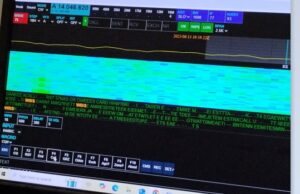
zBitX Web Display.

zBitX Web Display.

Setting up the WiFi is also important for another reason.  If you tire of the small screen on the zBitX, it’s possible to connect to the radio via the web, and use your computer to operate it wirelessly.  In order to do this, the device you are using must be connected to the same WiFi network as the zBitX.  So connecting to WiFi is important if you want to use this feature in the future.  Once you’ve connected to WiFi, this feature will be there an can be accessed whenever you want.  But to do the initial setup, you’ll need the peripherals hooked up.

The zBitX is capable of operating other digital modes (such as PSK31).  But this can only be done with a monitor, keyboard, and mouse connected.   So if you eventually want to use one of those modes (I haven’t done so yet), you’ll need those peripherals.  With the peripherals attached, the radio is pre-loaded with the WSJT software, so if you prefer that over the stripped-down version (especially if you want to use other WSJT modes), you have that option.

It should also be noted that once you have the radio hooked up to monitor, mouse, and keyboard, it is a full-fledged computer.  For example, it has a built-in web browser, and it should be able to run anything else a Raspberry Pi can run.

Also, the zBitX has a built-in log.  FT8 contacts get logged automatically, and you can also add CW or ‘phone contacts.  I haven’t taken full advantage of this, but when hooked up to a monitor, keyboard, and mouse, it’s possible to download an ADIF file.

But 99% of the time, I use the radio by itself, and I used it for over a week before I was able to hook up the monitor.

The Screen is Really Small!
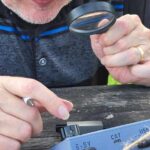
One thing that will come in very handy when using this radio is a magnifying glass!  When you are operating without an external monitor on FT8, the display is tiny, and you might not be able to make out call signs.  Having a magnifier handy really helps.  Also, the display gets overwhelmed by sunlight, so you do need some shade for operating outdoors.

Miscellaneous Glitches

As noted above, the rig does have a lot of software glitches. Once you get used to them, you can work around them and they can be almost endearing, but they are there. Essentially, sometimes, you tell the software to do something, and it doesn’t do it. Here are some of the the ones I’ve encountered.

The most annoying feature is that when you go from transmit to receive, it is not instantaneous. This seems to be the case on all modes. On CW, the break-in appears to be very fast, and you can hear the receiver as soon as you hit the last dit. But the receiver doesn’t regain its sensitivity for almost a full second. For much operating, this isn’t a big deal. But if you are contesting, the other station might have sent your full call sign in that short interval before the receiver comes to life. I don’t consider this to be a major flaw, because in most of my operating (such as POTA activating and chasing), it really doesn’t cause problems.

Another issue is the built-in keyer. Once the speed gets to a certain point, the onboard computer seems to be unable to keep up. So if you send an “H”, you’ll hold down the paddle for what you think is four dits, but the computer will generate three or five. I keep the keyer set to 15 WPM for this reason, even though normally, I would have it a bit faster. I think I could have it at 18 WPM, and it would work most of the time. But the keyer basically isn’t usable over about 20 WPM. So if you’re a speed demon, this rig might not be for you.

Update:  When I originally wrote this, I hadn’t experienced any serious problems with the keyer.  It’s slightly glitchy about about 18 WPM, but normally not bad.  I had seen some reports that the keyer was unusable, and I dismissed these.  However, a couple of times, the keyer on mine was so bad that it was totally unusable.  It was impossible to get the right number of dits and dahs, and it didn’t even work correctly with a straight key (although the macros and keyboard seemed to work fine.  I did find a workaround for this.  If it’s totally unusable on CW, then switch to another mode (FT8) and transmit in that mode.  Then, without switching back to CW, turn off the power and re-start it.  Only after restarting, switch back to CW.  This seems to fix the problem.  It’s not enough to merely restart.  Before restarting, you need to transmit in another mode.

As far as I can tell, the CW keyboard works fine, and doesn’t have any problem.  (You do need to type in rhythm with the radio.  If you get significantly ahead of the sending, it appears that some characters are lost.)  The radio has a number of macros (such as CQ) pre-programmed, and you can use these from the screen.  You can also enter text on the touchscreen, or use an external keyboard.  Keyboard CW isn’t my style, so I haven’t tested this extensively.  But it seems to work fine.

It does have a built-in code reader.  According to the instructions, you need to set the code speed to match what’s being sent.  When it’s set exactly right, the results are very good.  But you will rarely have the speed set right.  Because of the problems with the keyer, you can’t really set it much about 15 WPM and expect to send.  So it rarely decodes correctly.

Use for Emergency Grid-Down Communication

It’s possible that if you had machine-sent code on both ends, you might be able to use the code reader for keyboard-to-keyboard QSO’s.  I haven’t tested this, but it seems like a possibility.   One potential application for this radio would be for someone who wants reliable emergency or grid-down communications between two points with just a Technician license.  I think it would be possible to use two of these on 80, 40, or 15 meters, and with good conditions, I think reliable keyboard-to-keyboard CW might be possible.

On the other hand, it would require quite a bit of practice to get it set up properly.  In particular, I think there would need to be strong signals, and the code speed would need to be set identically on both units.  You couldn’t just put one of these in the “go bag” and expect to be able to start using it after a disaster.  At a minimum, both stations would need to coordinate in advance to make sure both radios are set to the same speed.  I think it would work, but no guarantees.  I have made keyboard QSO’s, but it does take some practice, since many of the functions don’t seem to be documented particularly well.  And even though I’ve done some sending by keyboard, I’ve copied by ear.  Just learning Morse Code is probably easier than messing around with trying to do it automatically, but it probably is possible.

When the received code matches the set speed, it does appear to decode pretty much perfectly.  But if the speed is not set correctly, then the display shows gibberish.   So again, advance practice is absolutely necessary.   But for most casual hamming, the code reader isn’t particularly useful.

Another method of possible grid-down communication is with the use of FT8, which allows transmission of very short text messages under very marginal conditions.  The FT8 protocol allows messages of up to 13 characters.  If you just want to tell someone you are safe, or let them know a location where you want to meet, this can be more than adequate.

I haven’t experimented with whether it’s possible to enter such messages without hooking up an external monitor.  However, it is quite simple to enter two elements of the message without any external hardware:  The call sign, and the 4-digit grid square.  I attempted some contacts on Field Day with FT8, and as can be shown from the map here, I was getting out, although not as well as I do at home.  I didn’t manage any actual QSO’s on FT8, as after trying for a while, I went back to CW where it was much more productive.

But even off the shelf, you can send messages of up to about 8 characters (using a designator after your call and changing the grid square), certainly enough to let a pre-arranged contact know that you are OK.

It should be noted that use of FT8 (other than on 10 meters) requires at least a General Class license.  But if you’re going to all the trouble of doing this, learning the material for an additional 35 test questions isn’t much to ask.  (We should note that while it may or may not be true that you don’t need a license after “TSHTF,” you definitely do need a license before that day.  And if you expect to use a radio like this to communicate even somewhat reliably, you will need to get a lot of practice, and that practice needs to happen long before anything hits any fan.)

It should also be noted that FCC rules prohibit the use of “messages encoded for the purpose of obscuring their meaning.”  So you’re not allowed to send secret message in your transmissions.  But there’s nothing inherently wrong about sending a short message, one word at a time.  So a radio like this, with a simple antenna, could be a very reliable method of short messages without any additional hardware.

Software Glitches

The software occasionally simply fails to do what you want it to do. For example, if you shift modes to CW, the display might still be showing that it’s set up for SSB. When this happens, you can simply try again, and it seems to fix itself. For example, if I go from FT8 to CW, the display might be showing a display relevant for SSB. When this happens, I select another mode (for example, FT8 again), and then try again going to CW. Invariably, the problem corrects itself.

These little glitches don’t seem to be consistent, but there is one glitch that always seems to happen. When I get on the air, I often like to start on the highest band and work my way down. But when I power up the rig and go to 10 meters, there is zero power output when I transmit. If I go to another band and transmit, even for just a second, and then go back to 10 meters, it’s working fine. So what I’ve taken to doing is starting out on 15 meters, putting out a CQ or two, and then going back to 10 meters. After the radio is “primed” in this fashion, it seems to work fine on 10 meters.

The built-in FT8 software seems to work fine, but it has its own idiosyncrasies.   As with the  WSJT software you’re probably familiar with, there is a window show the band activity.  So if you see someone calling CQ, you can click on their call, and it will automatically call them.  But curiously, the display doesn’t seem to show all band activity.  In fact, it doesn’t seem to show stations who are calling you.  When someone does call, their call sign shows up in the logging window, and if they successfully send your report, that shows up in the logging window.  And sometimes, the radio automatically sends “73” at the end of the QSO, and sometimes it doesn’t do this automatically.

Also, the list showing band activity can be difficult to navigate.  When you want to scroll to the bottom, it frequently resets all the way to the top.  So to see the most recent activity, you need to turn the little knob repeatedly until it scrolls down to the bottom.

As noted above, you can control the radio from another computer (or tablet or phone) using the web browser, as long as both are hooked to the same WiFi network.  But, like some other features, this one is glitchy.  Sometimes it works great, and sometimes it doesn’t work at all.  Eventually, I’m sure I’ll figure out the problem, but like with everything on this rig, there is a learning curve.

Conclusion

Overall, I’m still amazed at what this radio will do for the money.  Since it came, it’s the only radio I’ve used, and I’ve made hundreds of contacts with it.  I don’t think I would recommend this as your only radio.  As noted above, it has a lot of glitches.  It’s not designed for the appliance operator, and there’s an understanding that some hacking of both hardware and software will be necessary.  In fact, it comes with the Allen wrench necessary to open up the case.

Having said that, I am essentially an appliance operator, and I haven’t had to resort to that Allen wrench, nor have I had to go poking around the software.  But I am a reasonably experienced ham, and at least I know when it’s being glitchy and I need to try again.  For someone without experience, this radio might be an exercise in frustration.

As long as you are aware of the limitations, I think you will be amazed at what this little radio will do for the money.


Amazon links on this site are affiliate links, meaning that this site earns a small commission if you make a purchase after using the link.


AMECO AC-1 Transmitter Replica

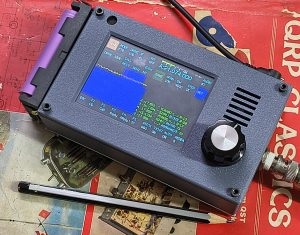
I recently acquired the radio shown here, the zBitX from HFSignals.com in India.  It is a transceiver that covers 80 through 10 meters, CW, SSB, and digital modes.  It’s a software defined radio (SDR) built around a Raspberry Pi computer, and it includes the software to operate FT8, with no additional hardware required.  I’ll be writing a complete review in the coming weeks, but this radio is absolutely amazing.  It is sold for under $200, including shipping from India.

Most of my QSOs so far have been FT8, and I have about 22 states confirmed after about a week of playing with it.  But my very first CW QSO was with Kosta, KY6AA.  I mentioned that I was running a new QRP rig, and he suggested that I check out his QRZ page to see another QRP rig.

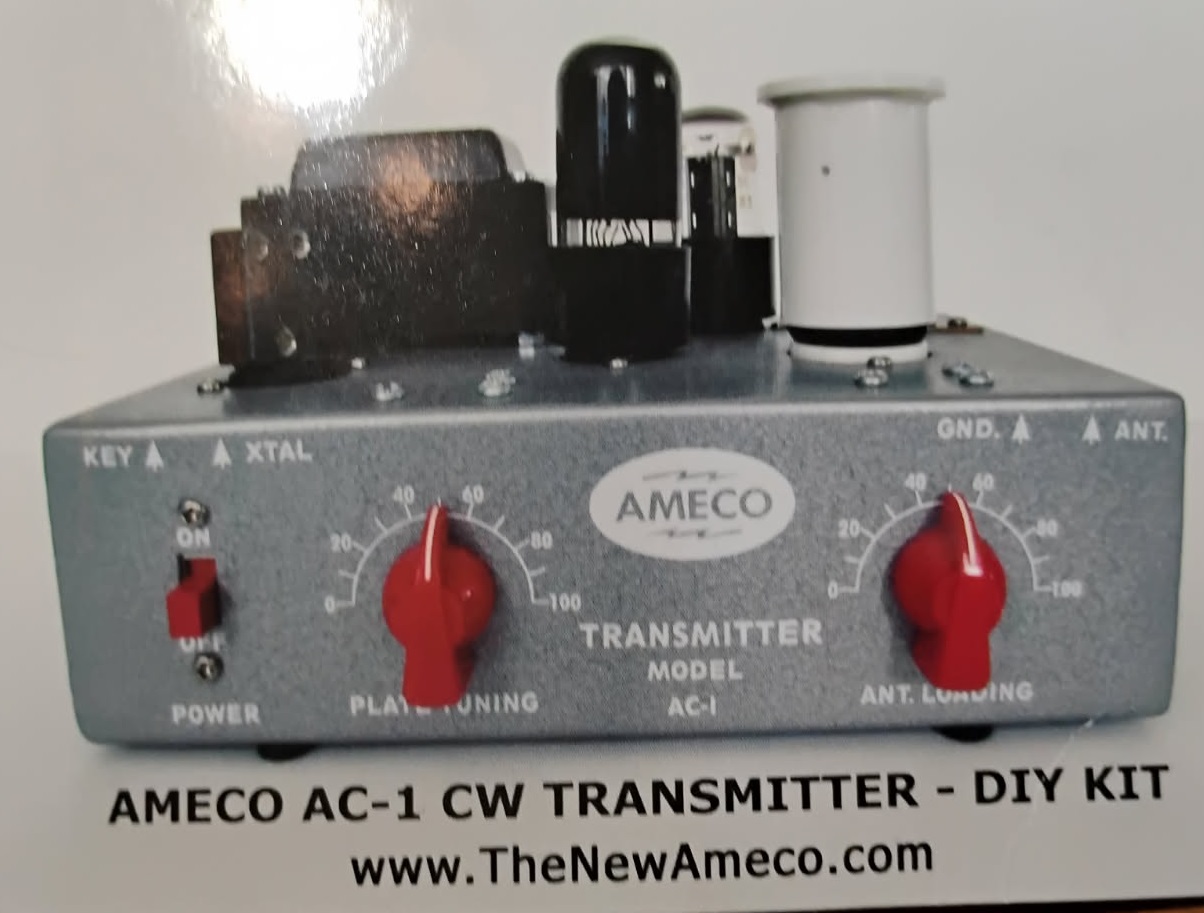
And what a QRP rig it was:  Kosta has kitted and is selling a reproduction of the the AMECO AC-1 novice transmitter.  I just received his QSL card, and it’s prominently featured on the back of the card here.   If you’re not familiar with that rig, it was mentioned here a few weeks ago in connection with a 1965 buyer’s guide for ham equipment.  It was a very basic transmitter for the novice, with about 15 watts input power.  While there might be some minor changes, the new kit is essentially the same as the original, with new parts, many of which (notably, the tubes and power transformer) are sourced from the former Soviet Union.

The replica kits (also available fully assembled) are for sale at TheNewAmeco.com for $230.32.  At first glance, that seems expensive for such a bare-bones transmitter.  But as we saw previously, the original sold for $19.95 in 1965.  According to this online inflation calculator, that works out to $203.17 in 2025 dollars, so the current version is pretty comparably priced.  So yes, it’s expensive today for such a basic transmitter.  But it was just as expensive back in the day.  The only difference is that back then, it was the least expensive option!  And you would still need a receiver (which would probably cost more).

The New Ameco has another product in the planning stage, a basic receiver of the same era.  If you look at that page, it might look familiar.  That’s because we previously featured the same design, by V.A. Egorov, UA3AB!

It would be fun to assemble the AC-1, and maybe I’ll get one some day.  But for the same money, I have the zBitX.  Not only does it transmit, but it receives.  It covers all HF bands, and all modes.  If I had bought an AC-1 back in the day, I doubt if I would have worked 22 states in the first week.  So don’t let anyone tell you that amateur radio is an expensive hobby!


Amazon links on this site are affiliate links, meaning that this site earns a small commission if you make a purchase after using the link.

Exploding Pagers and Radios

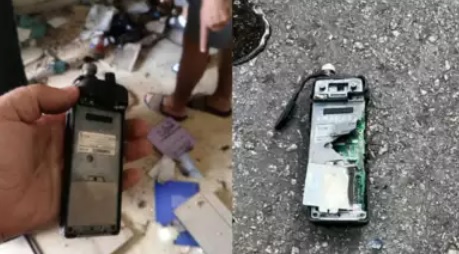
In the last few days, we’ve seen news reports of pagers and walkie-talkies owned by Hezbollah exploding in Lebanon.  Here’s how we think this operation was carried out.

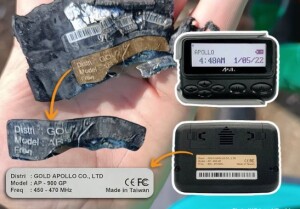
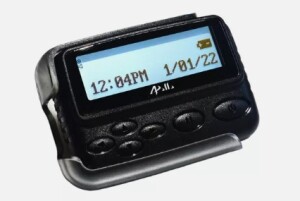
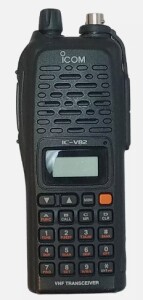
The devices in question appear to be the Apollo AP-900 pager, and the ICOM IC-V82 transceiver.  These models appear to be out of production, but they are still readily available.  In fact, the links above are to them on eBay.

The Pagers

The first round of simultaneous explosions involved the pagers.  When I first heard about it, I wondered whether it was some kind of software hack, which conceivably could cause an internal Lithium-Ion battery to explode.  But it turns out that’s impossible, because the pager actually uses an alkaline AAA battery.  (Since Lebanon’s power grid has collapsed, it makes sense to use alkaline batteries, rather than worrying about how to recharge the batteries.)  Even if you caused a direct short in a AAA alkaline, not much would happen.  Therefore, the pagers certainly had some type of explosive installed in them at “the factory.”

Hezbollah (wisely) abandoned use of things like cellular phones for communications with their people in the field.  Since a cell phone relies upon transmitting a signal, even to receive, there’s always a possibility of it being monitored or tracked.  Even receiving information via the Internet means that you leave a trace by connecting to some other computer.  If your adversary is Mossad, it’s almost certain that they’ll eventually start tracking it or monitoring it.  So it’s much smarter to use passive receivers to get your instructions.

This is a time-honored tradition.  For example, the words “blessent mon cœur d’une langueur monotone” were famously transmitted by London radio to inform the French resistance that the D-Day invasion was about to begin.  (The movie Red Dawn uses the phrase “John has a long moustache.”  This is actually a translation of “Jean a de longues moustache,”  another coded message (or dummy message) from the movie The Longest Day.  I’ve still never figured out whether that phrase was really used on D-Day, or whether it was from the movie.)

And to this day, numbers stations transmit coded messages to be picked up by agents in the field.  The general idea is the same:  The agent needs nothing more than a passive receiver to get the message.  They don’t have to transmit or make their presence known in any way.  While the existence of the message (or, if the code is broken, the contents of the message) is known to the other side.  But there’s no way of knowing who received the message.

The exploding pagers were just passive receivers.  While that model seems to be out of production, you can buy similar ones new on Amazon. They are typically used, for example, in restaurants to let you know your table is ready.  They can also be used in a hospital or factory to send messages to employees on the premises.  The transmitter is kept locally.  When a customer’s table is ready, or a nurse is needed, you simply push the right button on the transmitter, and the pager will sound off.

But there’s no way of knowing who has a pager.  Unless you see or hear someone using it (or perhaps, if you are extremely close to them picking up spurious emissions), there’s no way of knowing who has one, or who got the message.  You can receive messages anonymously.

Making it Explode

But if you get your hands on the passive receiver before the end user does, there is something you can do.  You can make it blow up!  All you need to do is add some explosive material, and a means of detonating it remotely.  Installing that requires a bit of stealth.  But once it’s in place, it’s easy to detonate.

The pager, whenever it’s turned on, listens to its frequency of about 450 MHz, listening for incoming messages.  When a message is received, the internal circuitry turns it on and displays an alphanumeric message.  It would be relatively easy to tap into this circuit.  So, for example, when the incoming message is 011001011011001, instead of displaying it alphanumerically, it just sends a message to the explosives that it’s time to detonate.

If you are on the other side, it’s not particularly difficult to figure out what frequency the pager is listening for.  If you capture one enemy pager, then you’ll know that information.  Or if you just listen long enough, you’ll realize that there’s a new pager transmitter on the air.  All you need to do is transmit on that frequency and send the detonate code.  If you’re not sure, or if the pagers are using multiple frequencies, you simply repeat the message. You already know the detonate code, because you’re the one who put it there.

The Walkie-Talkies

IC-V82. eBay image.

IC-V82. eBay image.

Update:  Icom Japan has issued a statement pointing out that this model has not been manufactured for ten years.  It seems likely that the radios in question were counterfeit, even before the addition of the explosive. 

The ICOM VHF transceivers are a slightly different issue, but it’s a quite easy matter to come up with the electronics to detonate one.  The IC-V82 is a fairly popular amateur 2 meter transceiver, as shown by these reviews. The version sold to Amateurs in the U.S. cover 144-148 MHz, but other versions probably cover approximately 144-175 MHz.

The radio can be tuned to multiple frequencies, and your intelligence needs to figure out which one.  Again, if you are unable to capture one, it’s an easy enough matter to simply listen and figure out what frequencies the enemy is using.  When the time comes, you can transmit on all of them, and most radios will be tuned to one of those frequencies.  If they hear the right tone or code, they will detonate.

This radio probably does have a Lithium-Ion battery.  It’s not involved in the initial explosion, but once the small bomb inside goes off, the battery probably adds considerably to the destruction.

Even though this radio is also capable of transmitting, you are relying only upon the receiver in order to blow it up.  You send a signal on whatever frequency the receiver is tuned to.  That signal activates the detonator you installed.  That circuit can be simplicity itself.

About 40 years ago, I built a circuit that could be used in that application.  It never really caught on, but for a time, U.S. Amateur Radio operators were toying with the idea of a “long tone zero” protocol.  If you needed help in an emergency, you could transmit a zero on your Touchtone pad, hold it down for a few seconds, and that tone would be used to turn on a receiver at someone’s house.  It was a good idea, but it never caught on.  But I built a decoder and hooked it to a receiver that I left on 24/7.  If someone needed to waken me, all they had to do would be to hold down their zero button for a few seconds, and my radio would come to life, full blast.

In my case, that circuit was on a PC board measuring a few inches.  But such a device could easily be constructed to be microscopic, and inserted into another component.  It’s hooked up somewhere in the radio’s normal audio stages.  When the correct tone is received, the circuit, instead of turning on the speaker, would detonate the explosive.

Sending the Detonate Signal

Once the Israelis know the frequencies, it’s an easy matter to transmit a signal to all affected devices.  The distance from Tel Aviv to Beirut is only 208 km (130 miles).  The distance from the Israel border to Beirut is even less.  So it’s a fairly trivial matter to transmit a signal from an airplane on the walkie-talkie’s frequency (about 150 MHz) or the pager’s frequency (about 450 MHz).  According to this line-of-sight calculator, an airplane at an elevation of 10,000 meters (30,000 feet) has a line of sight of 357 km.  In other words, a VHF or UHF signal transmitted from such an airplane over Israel will be heard loud and clear in Beirut, or almost anyplace in Lebanon.

Getting the bombs inside these devices was quite a coup by Israeli intelligence.  But they would be quite easy to disguise.  The circuit could be small enough to squeeze inside a replica of a capacitor or resistor that was already there.  But once it’s in place, the task of actually detonating it is trivially simple.


Some links on this site are affiliate links, meaning that this site earns a small commission if you make a purchase after using the link.

POTA/WWFF/U.S. Islands: Rock Island State Park, WI

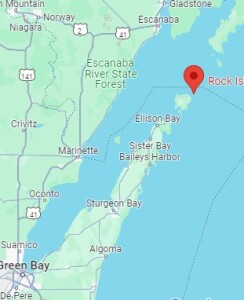
RockIslandRockIslandMapOver the Fourth of July weekend, my son and I decided to make a spur-of-the-moment camping trip to Rock Island State Park, Wisconsin, which is at the northern tip of Door County and at the entrance of Green Bay. It’s a state park accessible only by boat. Unless you have your own boat, you take a car ferry from the mainland to Washington Island, drive across that Island, park your car, and then take a passenger ferry to Rock Island.  No reservations are required for either ferry, and they add as many boats as necessary to accommodate the traffic.  We bought a round trip on both ferries at the dock, and the cost was about $90 for one car and two passengers.

cartThe campground is about a quarter mile from the boat landing, and the park provides carts, shown here, to move your stuff. My son did the hauling, and we quickly had our campsite, which was right on the shore of Lake Michigan, set up.

Like most state park campgrounds, sites fill up fast, especially on a holiday weekend. But when I checked two days before arrival, there were sites available for both Friday and Saturday night. They were different sites, meaning we would have to move after the first night. But fortunately, the occupants of one of the sites had left early, and after checking with the campground host and warden, we were allowed to have the same site both nights.

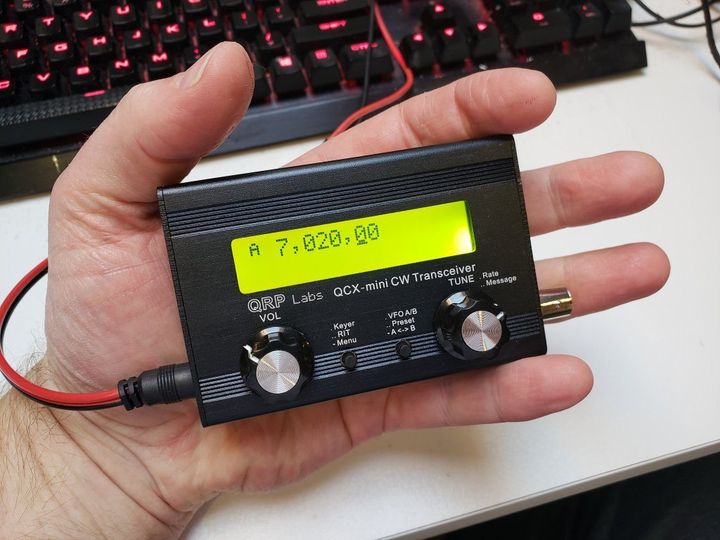
Of course, it wouldn’t be a camping trip without bringing a radio, and I brought along the QRP Labs QCX Mini, shown here. This is a handheld CW transceiver for one band (in my case, 40 meters). For the power supply, I brought along my fish finder battery, which I also used to charge my cell phone. (We did have good cell phone service from most of the island, including the campground, through Boost Mobile.  My son, on the other hand, who has service through Tello, had no signal, so your mileage might vary.)

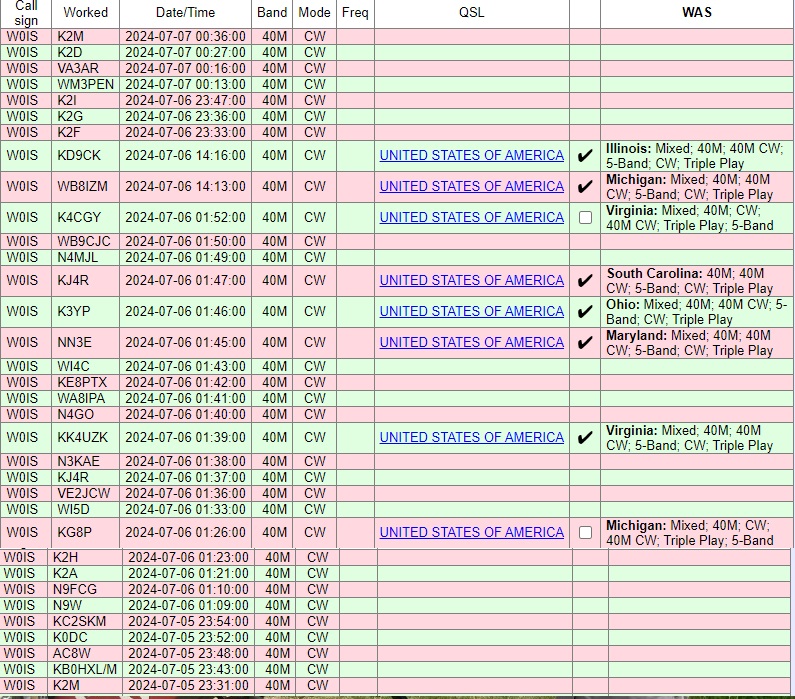
I made a total of 33 radio contacts over the course of a couple of hours, covering the eastern half of North America, from Quebec to Georgia.  If I had stayed up later, I would have been able to work the western United States.  But 40 meters covers long distances best at night, and I shut down around local sunset, meaning the West Coast didn’t have a chance to work me.  Ideally, I would have been on 20 meters as well for some daytime contacts, but I wanted to keep the station size and weight to a minimum.  The complete log is shown below.

GolfBallRetrieverI used my usual antenna, namely, a dipole supported by my trusty golf ball retriever leaning against the picnic table, with the two 33-foot wires extending out from the table.  The wires were actually just draped over tree branches.  You don’t need an elaborate antenna to get out well.  Despite the various reasons that it shouldn’t work (too low, touching trees, etc.), it got out very well.

You will notice that many of the contacts are with 1×1 call signs who, along with WM3PEN, were taking part in the 13 Colonies special event.  If you are doing a park activation during a similar event or contest, that’s always a good opportunity to put some contacts in the log.

Our campsite

Our campsite

Other notable contacts included WB8IZM, who was operating from another park, Potagannissing Flooding Wildlife Management Area near Sault Ste. Marie, Michigan, and KB0HXL, who was operating from his car in Indiana.

I’ve always enjoyed operating from remote locations with portable equipment, an activity which has gotten easier over the years with the advent of radios such as the QCX.  It’s also become a very popular activity.  Starting in 2016, the National Parks On The Air (NPOTA) activity was extremely popular, and after it ended, many American hams continued, thanks to the WWFF (World Wide Flora and Fauna in Amateur Radio) activity that had started to enjoy popularity in Europe.  Shortly thereafter, a separate program, Parks On The Air (POTA) has become extremely popular.  In addition, since I was on an Island, I was able to participate in the U.S. Islands Award Program.  I was able to hand out contacts for all three programs.  I didn’t make the required 44 contacts to make it an official activation for WWFF, but I was able to meet the minimums for both POTA and US Islands.  If I had been able to get on 20 meters, I’m sure I would have made many more contacts, but as it was, I was able to give credit for a fairly rare park.

And even though we had cell phone coverage (except for a brief outage on Sunday morning), it’s reassuring to know that, in case of emergency, we have a reliable method of communications with the outside world.

Rock Island boathouse (43110794831)Rock Island was originally developed as the vacation getaway of inventor Chester Thordarson, founder of the transformer company that bears his name.  He built the iconic boathouse shown here, which serves as the terminal for the passenger ferry.  The campground is located about a quarter mile away, with a more distant backpacking campground somewhat further away.  We also hiked to Pottawatomie Light , Wisconsin’s oldest lighthouse, dating to 1836.  The lighthouse is about 1.5 miles from the campground.

With carts available, setting up camp on foot was relatively easy.  Unlike backpacking, where you have to consider every ounce, the carts made the trip fairly easy.  It would have worked a bit better to bring a wagon from home, since we could have just packed it once before getting on the ferry.  Also, the provided carts were somewhat heavy, and a wagon probably would have been a bit easier to move.  Large wheels are important, because the paths on Rock Island are, well, rocky.  I was initially thinking of just packing things in a roll-on suitcase, but this would have been a bad choice, since the wheels would have just been too small.  We used an inexpensive tent and air mattress.  The ground is covered with roots and rocks, so some kind of pad is a must.

Flush toilets are available near the boathouse, and the campground has vault toilets.  Drinking water is available near the boathouse.  We realized on the way that we hadn’t brought a water container, so we just bought a one-gallon jug of water and filled it as needed.  Firewood is available on the island for $7 (cash only),  We used that for most of our cooking, although I did some of it on the emergency stove I previously reviewed.  I discovered that four fuel tablets were about enough to boil enough water for oatmeal and coffee.  We had only a very small cooler, so for the first night, we cooked some brats on the fire, but on the second day, we ate packaged food such as ramen noodles, to which you just add hot water.  Another convenient meal choice was a prepared meal such as Hormel Compleats.  These avoid any cleanup, since you can just put the sealed meal in a pot of hot water.  Packets of meat such as the pulled pork we previously reviewed are also easy to cook this way.

There is a very small camp store on Rock Island, but other than a few bags of chips and a few Clif bars, they don’t sell food or camping supplies.  It’s mostly souvenirs and apparel.  So you do need to plan ahead.  But as long as you do your minimal planning, Rock Island provides an opportunity to easily do some camping completely off the grid.

RockIslandLog

x


Some links on this site are affiliate links, meaning this site earns a small commission if you make a purchase after using the link.

MFJ Enterprises, 1972-2024

We were sad to hear the news recently that MFJ Enterprises will be shutting down production on May 17, 2024.  The company has long been a fixture in Amateur Radio, producing a wide variety of products, mostly station accessories, for the amateur market.  Their products have the distinction of being functional and utilitarian, and usually reasonably priced.  They are often dubbed “Mighty Fine Junk,” but it’s a term of endearment, with the emphasis on “mighty fine.”  They are junk in the sense that they are usually not professional grade.  But they usually serve their purpose well, and they will be missed.

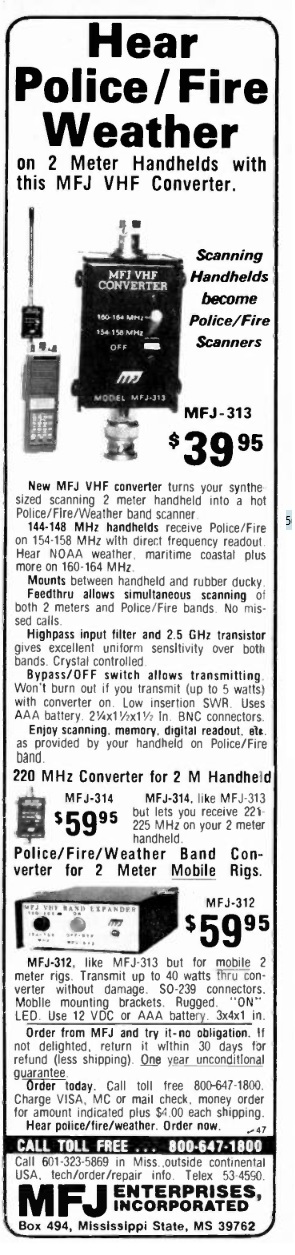
My first encounter with MFJ was probably the product shown at left, which is typical of their offerings:  It met a very specific need at a reasonable price.  It looked kind of clunky, but it worked well.  When the MFJ-313 VHF converter came out in 1982, inexpensive handheld radios for 2 meters were just hitting the market.  For example, my first HT was an Icom IC-2AT, which was priced at about $225.  Unlike most ham rigs these days, the radios of that era generally tuned only the ham bands.  So receiving was limited to 144-148 MHz.

The ability to tune other frequencies, particularly NOAA Weather on 162 MHz, was a useful addition, and the MFJ-313 solved that problem.  It was a receive converter, powered by a single AAA battery, that attached to the radio and antenna.  You could transmit right through it, “and it won’t burn out.”  But at a flip of a switch, the local oscillator inside the converter would come to life at 16 MHz, and you would be able to tune the weather on 162.55 by tuning the receiver to 146.55.

Most of MFJ’s products filled similar niche needs.  They weren’t glamorous, but they got their job done.

Another MFJ product I own is the MFJ-9040 CW transceiver for 40 meters.  There was a time when I had been off the air for a few years, and didn’t really have a station set up.  I wanted to get on the air fast, and this rig did the trick.  I’ve traveled to multiple countries with it, and it’s always performed well.  It’s not a perfect rig–it’s notorious for having a lot of frequency drift when first turned on.  But that’s part of the charm, and the drift isn’t too bad once it’s been turned on for a while.

You wouldn’t build your whole station using MFJ gear (although with rigs like the 9040, you certainly could).  But they took care of all kinds of needs.

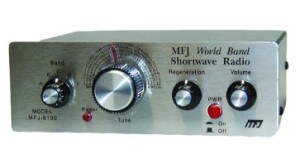
mfj8100kIf you’re still interested in getting in on the fun, the company isn’t going out of business just yet, and they undoubtedly have a lot of New Old Stock on hand in their warehouse, and at their many dealers.  If you want to build something, I would recommend their MFJ-8100K regenerative receiver.  It covers shortwave broadcast and amateur bands from 80 to 15 meters, and should be a relatively easy kit for the beginner.  It’s also available assembled.

I suspect that some of MFJ’s brands will be sold to other manufacturers, and it’s not all doom and gloom.  Those other little accessories they make, even if MFJ stops making them, will still be available.  For example, I really like my MFJ-9040, but QRP Labs has a superior product in the QCX Mini, which I previously reviewed.  We will miss MFJ, but amateur radio will continue.

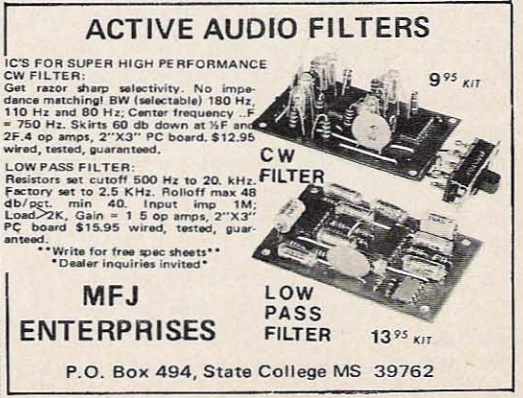
1972Dec73MFJ got its start in 1972, and as far as we can tell, it’s first products were the two audio filters shown in this ad in 73 Magazine, December 1972.  They made an innovative product, and kept adding more innovative products.  We’re confident that someone will do it again.

We thank MFJ’s founder and owner, Martin F. Jue, K5FLU, for over a half century of service to the Amateur Radio Community, and wish him the best in his retirement.


Some links on this site are affiliate links, meaning that this site earns a small commission if you make a purchase after using the link.