Category Archives: Product reviews

Easy HF Mobile Antenna

Now that I have my little zBitX transceiver, I’ve been trying it out during POTA activations. For Field Day, I set up a temporary dipole, but it’s always nice to be able to operate right from the car. In the past, I’ve used a trunk mount and a magnetic mount antenna. The trunk mount doesn’t fit very well on my car (a 2014 Dodge Journey), and the magnetic mount is old and in pretty bad shape.

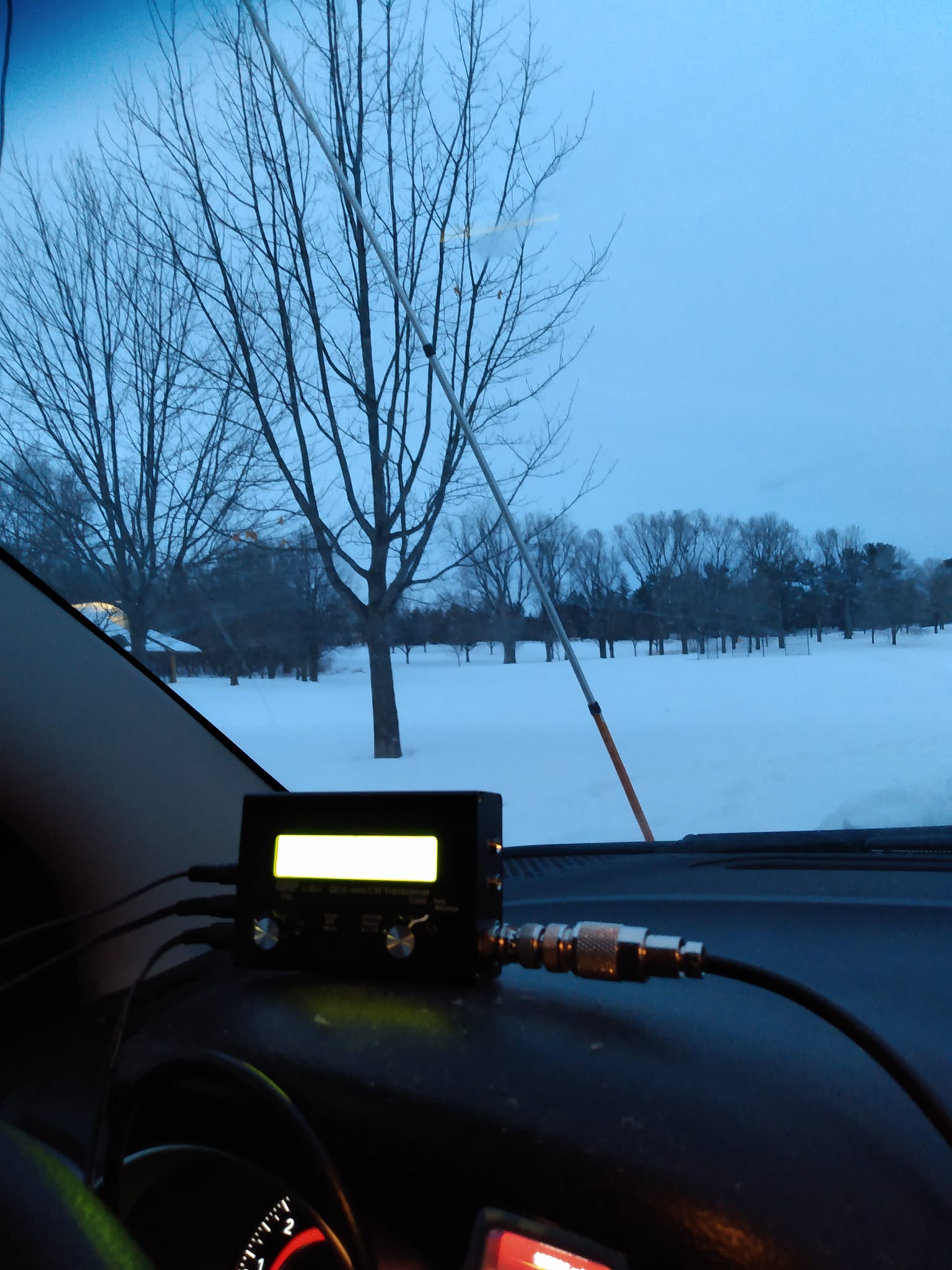
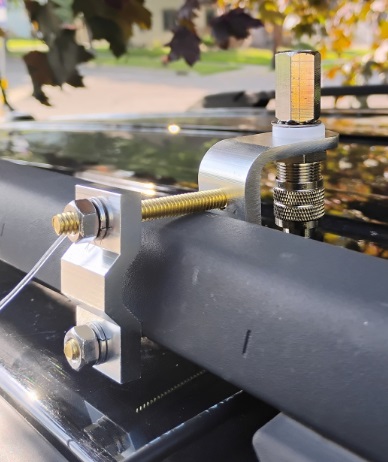
So I stopped at a truck stop on the way home from an activation and bought the mirror mount shown here. It fits (just barely) on the factory roof rack. I did have to make a run to the hardware store to replace the two bolts, as the ones provided weren’t quite long enough.  But it fits snugly and is secure.

As you can see, the coax connection just barely fits.  You do need to connect it before mounting the bracket.  I can use it with any of my Hamstick antennas, and today I tested it on 20 meters.

The mount that I purchased is Amarillo Supply Co. stock number 6163935, which is the store brand of Love’s Truck Stops, and you should be able to find it on the shelf at one of their locations.  Otherwise, it appears to be identical with this one at Amazon.

The purists will note that the rack appears to be made out of plastic, which is non-conductive.  So for a ground, I simply added a “radial” about 16 feet long.  You can see it attached to one of the bolts.  I ran that in the door, and around the molding of the rear door, out of sight.  Inside the car, also out of sight, it then goes to the front door, where it also runs around the molding.  I’ll probably add a couple more radials.

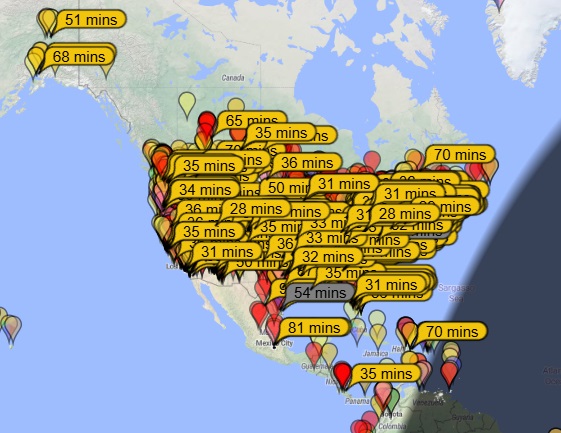
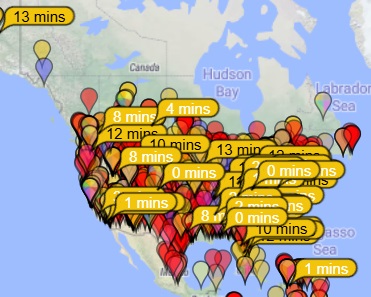
There are undoubtedly better ways to do it, but this provides an adequate ground.  I did another POTA activation today, and you can see that I was picked up on FT8 as far away as Costa Rica and Alaska.  And on CW, my signal was also picked up in the U.S. and Canada, as shown by the bottom map.


Some links on this site are affiliate links, meaning that this site earns a small commission if you make a purchase after using the link.

HFSignals zBitX Transceiver Review


Bottom Line: This little rig is an exceptional value, but it does have lots of idiosyncrasies.

As I mentioned previously, I recently acquired a zBitX transceiver from HFSignals.com. It’s made in India, and you can have one for $200, which includes shipping.

The company is based in India, although they seem to be incorporated in Delaware, USA.  This little radio is popular, and there is a waiting list.  In my case, it took about four weeks to ship after my order.  Once it was shipped, it took less than a week to get here via DHL.  (Mine is number 4017.)

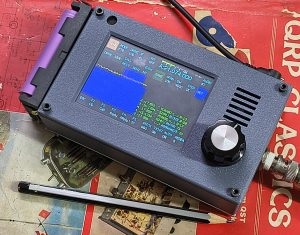
The radio is an exceptional value for the money, although it’s probably not a good choice for your first radio or only radio.  But even a few years ago, I never would have dreamed that I could have a complete HF station that fits in my pocket (albeit a rather large pocket).  It covers 80-10 meters, and will work CW, SSB, AM, FT8, and other digital modes.  What I find remarkable is that you can make FT8 contacts without any external hardware.

It’s perfect for activities such as Parks On The Air (POTA).  The image above is from Field Day, where over the course of about 2 hours, I worked about 20 contacts, most on CW, but one on SSB.  (I could have worked a lot more on CW if I hadn’t spent unfruitful time trying FT8).  As with most QRP activities, CW gets through a lot better than SSB.  If you’re planning on working SSB QRP (particularly when conditions aren’t great), it can be an exercise in frustration.  But the radio works on SSB, with the built-in microphone, and I’ve made two contacts, one on Field Day, and another during the West Virginia QSO Party.

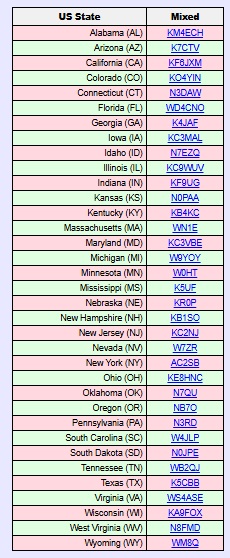
Within about three weeks, I worked 35 states, and my best confirmed DX is Italy.  I’ve used it mostly on FT8 and CW, although I have made those two SSB contacts (from Minnesota to West Virginia and New Hampshire).  I don’t have an external microphone, so I just talk into the radio.  The built-in microphone is at the upper left corner of the radio.

On the left is a list of states that I have confirmed so far, and at the right is a typical display from PSK Reporter showing where my signal was being picked up from my home.

The radio has only one knob, along with a touchscreen.  It came with a fine-point stylus, which is extremely useful.  You can use the type of stylus that you might normally use with your phone, although the fine point is helpful.  Theoretically, it would work with your fingers, but that would be extremely difficult, given the small size of the screen and the large size of most hams’ fingers.
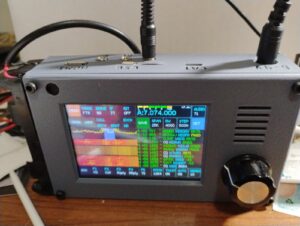
zBitX in operation at W0IS.

zBitX in operation at W0IS.

Basically, you tap on the portion of the screen you want to change, and then use the knob to change it.  So if you want to change frequency, you tap on the frequency, and start spinning the knob.  It does take a little getting used to.  For example, before turning the knob, you might need to adjust the steps, which can be from 10 Hz to 10 kHz.  So to quickly change frequency, you can set the stop to 10 kHz, and quickly go from one end of the band to the other.  The most convenient setting overall is 500 Hz.  To change the step, you click on that field, and then use the knob.  But you need to remember to click again on the frequency display.  So many times, I change the step, but forget to tap the frequency.  So when I spin the knob, only the step changes.

General Coverage Receiver

The receiver covers 500 kHz to 30 MHz, and as far as I can tell, it will transmit wherever it receives.  So you do need to be careful to stay inside the band.  The limited testing I’ve done shown that it performs reasonably well as a receiver, so if you need to listen to the AM radio, the shortwave broadcast bands, or WWV, it will be adequate, although probably not a stellar performer.  But one catch is that changing frequency can take a lot of time.

For example, if you want to listen to the AM broadcast band, you need to tune to the closest ham band, 80 meters.  Then, you need to set the tuning step to 10 kHz, and start spinning the dial to get from 3500 kHz down to the top of the AM band at 1700 kHz.  But you probably didn’t buy the radio to listen to AM, so that shouldn’t be a major concern.

Lack of Power Switch

One quirk about the radio is that it doesn’t have any kind of power switch.  To turn it off, you simply pull the power plug.  That isn’t a concern for a radio, but the computer purists out there will note that it’s not a good idea to simply cut the power to a computer.  And the zBitX is mostly a computer (a Raspberry Pi) with enough additional components to make it send and receive radio waves.  So it’s probably not the greatest way of doing things, but it seems to work.  Every time I’ve plugged the power back in, it comes back to life (after almost a minute of booting up).  When powered off, the radio maintains memory of the logbook, as well as your call, grid square, and settings.  On one occasion, my call sign and grid disappeared when I powered the radio back up.  I assume this is the result of the power-off sequence (or the lack of one).  But other than that, I haven’t experienced any problems.

Power Supply

The radio comes with a built-in battery holder on the side designed to hold two 18650 Li-ion batteries.  I ordered this four pack, which includes a charger, placing the order before the radio came.  It turns out 18650 batteries come in two forms:  a “flat-top” and a “button-top.”  The button-top looks kind of like a AA cell, in that the positive end has a little bump.  the flat-top is flat on both sides.  It turns out that, had I read the instructions, the flat-top was called for, and I ordered the wrong ones.  However, the button-tops worked just fine, although it’s a bit of a tight fit.

The button-top actually has an advantage, since it’s obvious which side is positive.  One thing you never want to do on this rig is hook the power supply up backwards.  Apparently, there’s a diode in the circuit to protect against this.  But there’s no fuse, so a trace on the circuit board leading to that diode is what would get fried.  The takeaway is that you never, never, want to get the polarity wrong!  When you’re putting in batteries, check and double check.

In retrospect, I’m not sure if I would have bought these batteries.  They last for about one hour of normal operation.  Not only are you running the transmitter, but the internal computer is powered up the full time.  Having built-in batteries is somewhat satisfying, since you have essentially a handie-talkie for 80 through 10 meters.  But it’s much more practical to run the radio from an external power supply.  In my case, I use my lead-acid fish finder battery, which allows operation for longer than I ever need it.  But the radio does not operate directly off 12 volts.  Instead, it’s set up for 6-9 volts.  Apparently, it will work with 12 volts, but it’s not advised, because it will stress the voltage regulators inside.  The radio gets very hot as it is, and it’s probably not a good idea to add to this.
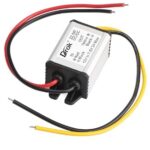
The power supply I'm using.

The power supply I’m using.

So to power the radio, I ordered this inexpensive buck converter, which drops the 12 volts to 7.5 volts.  Edit:  That one is now out of stock, but this one is equivalent.  The power connector on the radio is a 5.5 x 2.1 mm coaxial connector, and I ordered this cable to hook to the converter.  Rounding out the installation, I ordered this 12 volt cigarette lighter cord to connect to the input of the converter.  Once I had this set up, I haven’t used the built-in batteries, although I guess that option is good to have.  But some users might want to make the radio look a little more sleek by removing the battery holder.

Yes, the Receiver Picks up Noise from the Computer.

Other reviewers have noted that the receiver is subject to some noise from the computer (or quite likely, from the display).  This does seem to be true.  I haven’t done any extensive testing, but the receiver seems to be less sensitive than other receivers, probably for this reason.  But for a QRP rig, the receiver seems to be more than adequate.

In fact, the display noise is a bit of a feature, rather than a bug.  When I select something on the touch screen, I can hear it ever so slightly in the receiver audio.  So you get an audible confirmation that you touched the button.

Yes, the Radio Gets Hot.

As noted above, the radio goes through a set of batteries quite fast, and part of the reason is that it’s generating a lot of heat.  This seems particularly true when operating FT8, since it’s transmitting 100% power 50% of the time.  But even on other modes, the radio gets warm.  Some users have come up with various heat sinks, although I haven’t bothered.  I have noticed that if you set the radio vertically, it doesn’t get as warm.  If it’s laying flat, the back gets very warm, and having a little bit of airflow seems to make a big difference.

If you’ve ever had a long ragchew with a 2 meter handheld running 5 watts, you might notice that it also gets warm.  While it’s noticeable with the zBitX, I don’t consider it troubling.

What You’ll Need to Get Started
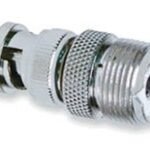
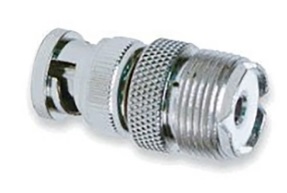
I ordered the batteries while the radio was still on the way, and I was able to get the radio on the air as soon as it arrived.  The antenna connection is a BNC connector, so if your antenna has a PL-259, you’ll need this adapter.

As long as you have batteries and a way to hook up an antenna, you can get on the air immediately on FT8, CW, or SSB.  (Of course, unless you plan on using the CW keyboard, you’ll need a set of paddles.)  However, to unlock other features, you’ll need to use, at least temporarily, an HDMI monitor, a keyboard, and a mouse.  Surely, you can find those in your junkbox, but if not, the preceding links are to cheap but perfectly adequate versions at Amazon.
The radio has a mini-HDMI socket for the monitor, so if you already have an HDMI cable lying around, you will need this adapter.  If you don’t have a cable, you can order this one.

To plug in the mouse and keyboard, the radio has a USB-C connector.  The radio comes with an adapter from USB-C to USB.  (Apparently, some recent purchasers didn’t get that adapter, so you might want to get one on Amazon.)  But there’s only one socket on the radio, so you’ll need a USB splitter to hook them up at the same time.  I suspect that you could get along without this, because I think you could use the mouse, click where you need to, and then plug in the keyboard.

Operating Without Display, Keyboard, and Mouse

As noted above, the external devices are not necessary to get on the air.  If you’re like me, you can be on the air as soon as the radio arrives, as long as you have power and an antenna.  You can use CW right away.  A set of paddles is best, but you could do it with the on-screen keyboard and macros.  FT8 requires no external hardware, and you can use SSB with the built-in microphone.

But there are a couple of setup tasks that are helpful and require connections to the external components.  First of all, you will eventually need to set the time in the zBitX.  This is done over the Internet.  The radio comes pre-set from the factory, and when it arrived, the clock seemed to be close enough for FT-8 operation, which requires that the clock be within about one second.  Interestingly, the hours and minutes were way off from the factory, but the seconds were accurate.  But for the internal logbook to be accurate, you need the date, hours, and minutes.  As soon as you connect to WiFi for the first time, it will automatically set the clock.  I set it up with the home WiFi, but I also had it make the connection to my cell phone hotspot, so that I can use these features away from home.
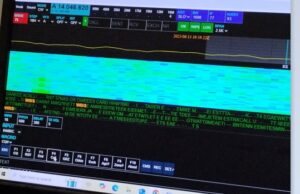
zBitX Web Display.

zBitX Web Display.

Setting up the WiFi is also important for another reason.  If you tire of the small screen on the zBitX, it’s possible to connect to the radio via the web, and use your computer to operate it wirelessly.  In order to do this, the device you are using must be connected to the same WiFi network as the zBitX.  So connecting to WiFi is important if you want to use this feature in the future.  Once you’ve connected to WiFi, this feature will be there an can be accessed whenever you want.  But to do the initial setup, you’ll need the peripherals hooked up.

The zBitX is capable of operating other digital modes (such as PSK31).  But this can only be done with a monitor, keyboard, and mouse connected.   So if you eventually want to use one of those modes (I haven’t done so yet), you’ll need those peripherals.  With the peripherals attached, the radio is pre-loaded with the WSJT software, so if you prefer that over the stripped-down version (especially if you want to use other WSJT modes), you have that option.

It should also be noted that once you have the radio hooked up to monitor, mouse, and keyboard, it is a full-fledged computer.  For example, it has a built-in web browser, and it should be able to run anything else a Raspberry Pi can run.

Also, the zBitX has a built-in log.  FT8 contacts get logged automatically, and you can also add CW or ‘phone contacts.  I haven’t taken full advantage of this, but when hooked up to a monitor, keyboard, and mouse, it’s possible to download an ADIF file.

But 99% of the time, I use the radio by itself, and I used it for over a week before I was able to hook up the monitor.

The Screen is Really Small!
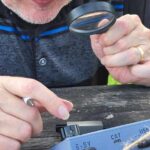
One thing that will come in very handy when using this radio is a magnifying glass!  When you are operating without an external monitor on FT8, the display is tiny, and you might not be able to make out call signs.  Having a magnifier handy really helps.  Also, the display gets overwhelmed by sunlight, so you do need some shade for operating outdoors.

Miscellaneous Glitches

As noted above, the rig does have a lot of software glitches. Once you get used to them, you can work around them and they can be almost endearing, but they are there. Essentially, sometimes, you tell the software to do something, and it doesn’t do it. Here are some of the the ones I’ve encountered.

The most annoying feature is that when you go from transmit to receive, it is not instantaneous. This seems to be the case on all modes. On CW, the break-in appears to be very fast, and you can hear the receiver as soon as you hit the last dit. But the receiver doesn’t regain its sensitivity for almost a full second. For much operating, this isn’t a big deal. But if you are contesting, the other station might have sent your full call sign in that short interval before the receiver comes to life. I don’t consider this to be a major flaw, because in most of my operating (such as POTA activating and chasing), it really doesn’t cause problems.

Another issue is the built-in keyer. Once the speed gets to a certain point, the onboard computer seems to be unable to keep up. So if you send an “H”, you’ll hold down the paddle for what you think is four dits, but the computer will generate three or five. I keep the keyer set to 15 WPM for this reason, even though normally, I would have it a bit faster. I think I could have it at 18 WPM, and it would work most of the time. But the keyer basically isn’t usable over about 20 WPM. So if you’re a speed demon, this rig might not be for you.

Update:  When I originally wrote this, I hadn’t experienced any serious problems with the keyer.  It’s slightly glitchy about about 18 WPM, but normally not bad.  I had seen some reports that the keyer was unusable, and I dismissed these.  However, a couple of times, the keyer on mine was so bad that it was totally unusable.  It was impossible to get the right number of dits and dahs, and it didn’t even work correctly with a straight key (although the macros and keyboard seemed to work fine.  I did find a workaround for this.  If it’s totally unusable on CW, then switch to another mode (FT8) and transmit in that mode.  Then, without switching back to CW, turn off the power and re-start it.  Only after restarting, switch back to CW.  This seems to fix the problem.  It’s not enough to merely restart.  Before restarting, you need to transmit in another mode.

As far as I can tell, the CW keyboard works fine, and doesn’t have any problem.  (You do need to type in rhythm with the radio.  If you get significantly ahead of the sending, it appears that some characters are lost.)  The radio has a number of macros (such as CQ) pre-programmed, and you can use these from the screen.  You can also enter text on the touchscreen, or use an external keyboard.  Keyboard CW isn’t my style, so I haven’t tested this extensively.  But it seems to work fine.

It does have a built-in code reader.  According to the instructions, you need to set the code speed to match what’s being sent.  When it’s set exactly right, the results are very good.  But you will rarely have the speed set right.  Because of the problems with the keyer, you can’t really set it much about 15 WPM and expect to send.  So it rarely decodes correctly.

Use for Emergency Grid-Down Communication

It’s possible that if you had machine-sent code on both ends, you might be able to use the code reader for keyboard-to-keyboard QSO’s.  I haven’t tested this, but it seems like a possibility.   One potential application for this radio would be for someone who wants reliable emergency or grid-down communications between two points with just a Technician license.  I think it would be possible to use two of these on 80, 40, or 15 meters, and with good conditions, I think reliable keyboard-to-keyboard CW might be possible.

On the other hand, it would require quite a bit of practice to get it set up properly.  In particular, I think there would need to be strong signals, and the code speed would need to be set identically on both units.  You couldn’t just put one of these in the “go bag” and expect to be able to start using it after a disaster.  At a minimum, both stations would need to coordinate in advance to make sure both radios are set to the same speed.  I think it would work, but no guarantees.  I have made keyboard QSO’s, but it does take some practice, since many of the functions don’t seem to be documented particularly well.  And even though I’ve done some sending by keyboard, I’ve copied by ear.  Just learning Morse Code is probably easier than messing around with trying to do it automatically, but it probably is possible.

When the received code matches the set speed, it does appear to decode pretty much perfectly.  But if the speed is not set correctly, then the display shows gibberish.   So again, advance practice is absolutely necessary.   But for most casual hamming, the code reader isn’t particularly useful.

Another method of possible grid-down communication is with the use of FT8, which allows transmission of very short text messages under very marginal conditions.  The FT8 protocol allows messages of up to 13 characters.  If you just want to tell someone you are safe, or let them know a location where you want to meet, this can be more than adequate.

I haven’t experimented with whether it’s possible to enter such messages without hooking up an external monitor.  However, it is quite simple to enter two elements of the message without any external hardware:  The call sign, and the 4-digit grid square.  I attempted some contacts on Field Day with FT8, and as can be shown from the map here, I was getting out, although not as well as I do at home.  I didn’t manage any actual QSO’s on FT8, as after trying for a while, I went back to CW where it was much more productive.

But even off the shelf, you can send messages of up to about 8 characters (using a designator after your call and changing the grid square), certainly enough to let a pre-arranged contact know that you are OK.

It should be noted that use of FT8 (other than on 10 meters) requires at least a General Class license.  But if you’re going to all the trouble of doing this, learning the material for an additional 35 test questions isn’t much to ask.  (We should note that while it may or may not be true that you don’t need a license after “TSHTF,” you definitely do need a license before that day.  And if you expect to use a radio like this to communicate even somewhat reliably, you will need to get a lot of practice, and that practice needs to happen long before anything hits any fan.)

It should also be noted that FCC rules prohibit the use of “messages encoded for the purpose of obscuring their meaning.”  So you’re not allowed to send secret message in your transmissions.  But there’s nothing inherently wrong about sending a short message, one word at a time.  So a radio like this, with a simple antenna, could be a very reliable method of short messages without any additional hardware.

Software Glitches

The software occasionally simply fails to do what you want it to do. For example, if you shift modes to CW, the display might still be showing that it’s set up for SSB. When this happens, you can simply try again, and it seems to fix itself. For example, if I go from FT8 to CW, the display might be showing a display relevant for SSB. When this happens, I select another mode (for example, FT8 again), and then try again going to CW. Invariably, the problem corrects itself.

These little glitches don’t seem to be consistent, but there is one glitch that always seems to happen. When I get on the air, I often like to start on the highest band and work my way down. But when I power up the rig and go to 10 meters, there is zero power output when I transmit. If I go to another band and transmit, even for just a second, and then go back to 10 meters, it’s working fine. So what I’ve taken to doing is starting out on 15 meters, putting out a CQ or two, and then going back to 10 meters. After the radio is “primed” in this fashion, it seems to work fine on 10 meters.

The built-in FT8 software seems to work fine, but it has its own idiosyncrasies.   As with the  WSJT software you’re probably familiar with, there is a window show the band activity.  So if you see someone calling CQ, you can click on their call, and it will automatically call them.  But curiously, the display doesn’t seem to show all band activity.  In fact, it doesn’t seem to show stations who are calling you.  When someone does call, their call sign shows up in the logging window, and if they successfully send your report, that shows up in the logging window.  And sometimes, the radio automatically sends “73” at the end of the QSO, and sometimes it doesn’t do this automatically.

Also, the list showing band activity can be difficult to navigate.  When you want to scroll to the bottom, it frequently resets all the way to the top.  So to see the most recent activity, you need to turn the little knob repeatedly until it scrolls down to the bottom.

As noted above, you can control the radio from another computer (or tablet or phone) using the web browser, as long as both are hooked to the same WiFi network.  But, like some other features, this one is glitchy.  Sometimes it works great, and sometimes it doesn’t work at all.  Eventually, I’m sure I’ll figure out the problem, but like with everything on this rig, there is a learning curve.

Conclusion

Overall, I’m still amazed at what this radio will do for the money.  Since it came, it’s the only radio I’ve used, and I’ve made hundreds of contacts with it.  I don’t think I would recommend this as your only radio.  As noted above, it has a lot of glitches.  It’s not designed for the appliance operator, and there’s an understanding that some hacking of both hardware and software will be necessary.  In fact, it comes with the Allen wrench necessary to open up the case.

Having said that, I am essentially an appliance operator, and I haven’t had to resort to that Allen wrench, nor have I had to go poking around the software.  But I am a reasonably experienced ham, and at least I know when it’s being glitchy and I need to try again.  For someone without experience, this radio might be an exercise in frustration.

As long as you are aware of the limitations, I think you will be amazed at what this little radio will do for the money.


Amazon links on this site are affiliate links, meaning that this site earns a small commission if you make a purchase after using the link.

Product Review: Holy Locust Biblical Energy Bar

LocustBar2

Bottom Line: John the Baptist ate well in the desert.

Hieronymus Bosch's St. John the Baptist in the Wilderness

Hieronymus Bosch’s St. John the Baptist in the Wilderness

We recently received a free sample of the Holy Locust Biblical Energy Bar from the manufacturer, in exchange for an honest review.   According to the Bible (Matthew 3:4), John the Baptist sustained himself in the desert on locusts and wild honey. It should be noted that the locust is perfectly kosher to eat (Leviticus 11:22).

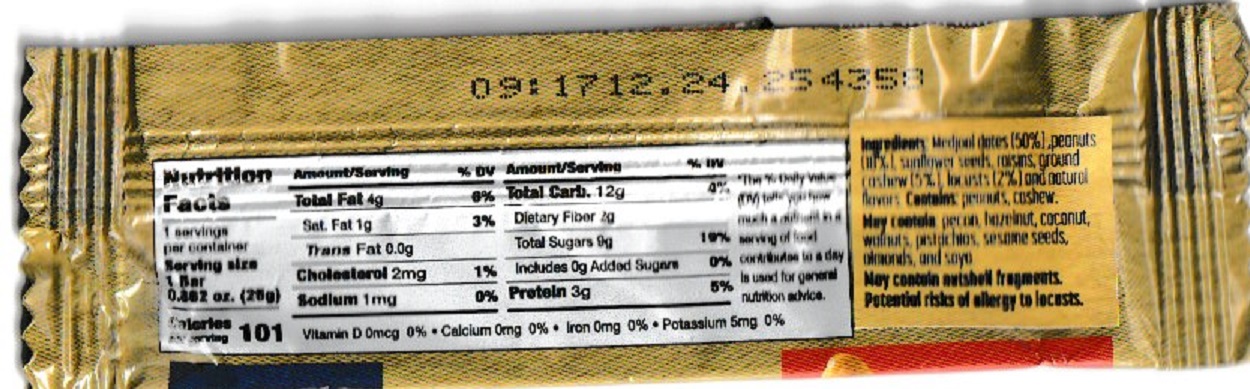
While locusts are still eaten in some parts of the world, theyIsraelFlag have fallen out of favor in Western diets. But thanks to Israeli entrepreneur Dror Tamir, that’s changing. He founded Holy Locust to revive that lost Biblical food to feed the masses. He is in the midst of a 1000 day quest to replicate John the Baptist’s diet, and you can follow on Instagram.  His company, Holy Locust, is making available locusts sourced from the banks of the River Jordan. Products include roasted whole locusts, Biblical protein shakes, and Biblical energy bars, consisting of dates, nuts, and locust protein. The protein used in the bars and shakes is locust flour, made from dried locusts ground into powder.

Trying the Holy Locust Bar

Of course, as soon as we heard of this innovative food, we wanted to give it a try. In exchange for our honest review, Holy Locust provided a sample, which arrived in the mail from Israel today.

LocustBar

As you can see from the nutrition facts above, the bulk of the product is dates, followed by peanuts, sunflower seeds, raisins, and ground cashew. Locusts make up only 2% of the product. At first, it sounded as if they were skimping on the marquee ingredient. But when we gave it some thought, it sounded reasonable. Before being added, the locusts were dehydrated and ground up. I couldn’t find definitive information as to the water content of locusts, but according to this article, the water content of another insect is 58%. Since most living things are mostly water, this seems reasonable. The locusts are there mostly for the protein, and they are apparently an excellent source of protein. So it seems reasonable that adding 2% of practically pure protein adds a huge boost to the other ingredients.

Most importantly, the Holy Locust bars taste great! You can watch the video below of my uboxing (unwrappering) of this unique product and my first taste.

The most prominent flavor, of course, is the dates. The snack tastes not unlike many “fruit and grain” bars. There was no particular taste from the locusts, but the overall flavor did complement the dates. Again, it tastes not unlike any other fruit and grain bar you might find in the snack aisle of your favorite supermarket.

The cost of the bars is $19 for a box of six bars. If you order one or two boxes, shipping is a flat rate of $14.95. If you order three or more boxes, shipping is free. So they are not currently a cheap snack, as we’re sure you can find a comparable product at a lower price at your supermarket. But they are certainly an affordable product, if you wish to try this sustainable protein source. For the full locust experience, a small jar of whole locusts, oven roasted, is available for $12. The net weight of that product is not shown, but it appears to be about a dozen individual locusts.  Other reviews I’ve seen are positive, and it looks like one of these would also be a tasty snack, suitable for a salty component of trail mix.

If you wish to cut out the middleman and capture your own locusts, you can find some recipes on this page.

No, John Didn’t Eat Carob Beans

Invariably, when Holy Locust mentions their product, some troll comes along and announces that John the Baptist wasn’t really eating locusts.  I have a feeling that some of these people ordinarily consider themselves to be biblical literalists, but they’re just too squeamish to accept the fact that insects could be a food.  The competing theory is that when the Bible says locust, it doesn’t really mean locust.  Instead, by some convoluted logic, it really means the beans of a carob tree pod.  This argument is easily put to rest.  In the original Greek, the word for locust is ἀκρίδες (akrides).  This word appears one other place in the New Testament, Revelation 9:3, “And out of the smoke locusts came down on the earth and were given power like that of scorpions of the earth.”  It strains credulity to think that carob beans are going to one day descend from the sky and start attacking.  It’s clear that when Matthew said locusts, he was talking about locusts.  I’ve had carob before, and it’s a somewhat tasty alternative to chocolate.  But it’s not what John the Baptist was eating.

Insects for Emergency Preparedness

Since one of the focuses  of this site is on emergency preparedness, it hasn’t escaped our notice that during a food emergency, locusts and other insects might constitute an emergency food source. Among many reference works on the subject is Insects: An Edible Field Guide by Stefan Gates.  While it would not be economical to stock up on locusts for use in an emergency, one might gain some confidence in the locust as a nutritious food item now.  And a good way to do that is to try some from Holy Locust.

Bottom Line

We know that most of our readers are not squeamish.  And even those who are squeamish might overcome this condition by trying this healthful and tasty snack.  While they’re a bit pricey, keep in mind that they come with bragging rights that you ate the same thing as John the Baptist.  Their high protein sustained him in the wilderness, and they’ll do so for you as well.
תהנה מהארוחה שלך!


Some links on this site, such as Amazon links, are affiliate links, meaning that this site earns a small commission if you make a purchase after using the link. Links to Holy Locust, however, are not compensated in any way.

The Easy Way To Get Cell Phone Service in Canada for Visitors

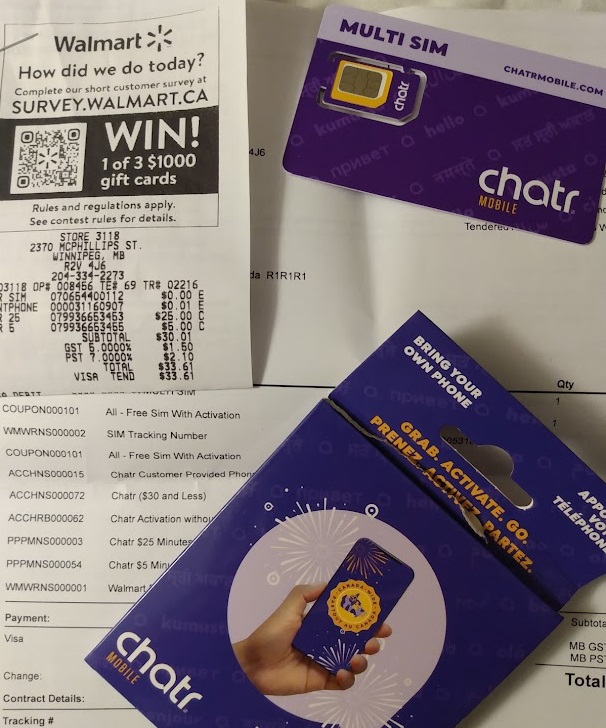
CanadaSimCardWalmartCanada is not friendly roaming territory for many U.S. cell phones. Some U.S. providers have excellent roaming in Canada, but in many cases, your cell phone is dead weight north of the border. In many cases, you can probably get roaming by calling your provider before you go. But there’s an easier way.

My plan doesn’t provide any coverage north of the border. My phone read “emergency calls only,” so I assume I could have called 911.  And, of course, I could use it with a WiFi connection.  But voice, data, and text service was unavailable. The problem was easily remedied. I stopped at a Walmart (in particular, the North Winnipeg Garden City store), and the helpful friendly staff quickly got me set up with chatr mobile, an affiliate of Rogers Communications. For about $33 Canadian (about US$24), they sold me a SIM card, installed it in my existing phone, and started my prepaid service for one month.  I’m sure many other retailers could have helped me, but Walmart seemed the most convenient.

I now have my very own Canadian telephone number, and if I visit Canada again, I can simply use the same SIM card.  You won’t be able to receive calls to your U.S. number, but all of your contacts will still be in your phone, and you can call or text, as well as make use of the generous data plan.

Keep your existing SIM card in a safe place, because you’ll need to re-install it when you get back to the United States.  The Walmart employees will put in the Canadian SIM card, but you’ll be on your own putting it back.  But watch them carefully, and you see that the swap is a fairly easy process.  You don’t really need it, but it won’t hurt to get a SIM card removal tool.

You don’t have to change it immediately, since you will still have service in the United States with the Canadian card installed.  Minutes after crossing the border back to the U.S., I received a text informing me that they had great roaming options and I should purchase one.  However, the phone kept working, and it notified me that even without one, service was available, albeit at rather steep prices.  Calls were $1.45 per minute, and texts were 75 cents each.  I did use the service for a bit, and had a sufficient balance to do so.

Ironically, in the U.S. border town of Pembina, ND, I had service with my Canadian number, even though I didn’t have service there from my U.S. provider.  So I was in no rush to change it.  If you want to avoid the hassle entirely, you can bring a second phone with you (perhaps your old one, or a cheap unlocked phone purchased from Amazon).  They can install the SIM card in that phone, and you can just use it whenever you go to Canada.  Another option is to buy a phone there.  They had Android phones starting for about $100 Canadian, although comparable phones would be cheaper in the U.S.

ChatrMapIn Canada, the chatr service was extraordinarily good.  I don’t think I encountered a single dead spot, even though I was further north than most Canadians ever venture.  I drove from the border to Thompson, Manitoba, which is 473 miles (761 km) north of Winnipeg.  But the entire highway had cell phone coverage, even though there were stretches where it was 200 kilometers between gas stations.  Looking at the coverage map, I can see that even a few miles off the highway, there would be no service, but I was impressed with the service.  Your best bet is to check with the local retailer, whether it’s Walmart or some other store, and get their advice on which service is best for where you will be going.

Prices will vary, but probably won’t be much higher than the $33 I paid.  In fact, a few weeks earlier, my son had done the same thing for about $25, and received a $25 Walmart gift card as part of a special promotion.  So in his case, the phone service was basically free.  If you’re going to be there for more than a month, it might be worth shopping around for price.  But for convenience, you can’t beat walking into Walmart and walking out with a phone that’s good for a month of prepaid service.


Winter Field Day 2023 – QCX Mini Review

327057549_420653090238651_583568416017169018_nThis weekend was Winter Field Day, an event in which amateur radio operators set up at a remote location and see how many contacts they can make. Two years ago, many hams stayed home in the mistaken belief that being in a field somehow causes COVID. To dispel that notion, I set up at a state park campground, where I operated while socially distancing myself hundreds of feet from other persons.

Last year, I operated a little bit from home, albeit with battery power, and doing my best to work only portable stations. But the name of the event is Field Day, and it doesn’t make a lot of sense to do it anywhere but out in the field. Santa Claus recently gave me a new QRP (low power) radio, the QCX Mini for 40 meters, and this was a good opportunity to put it to work.

Review of QCX Mini

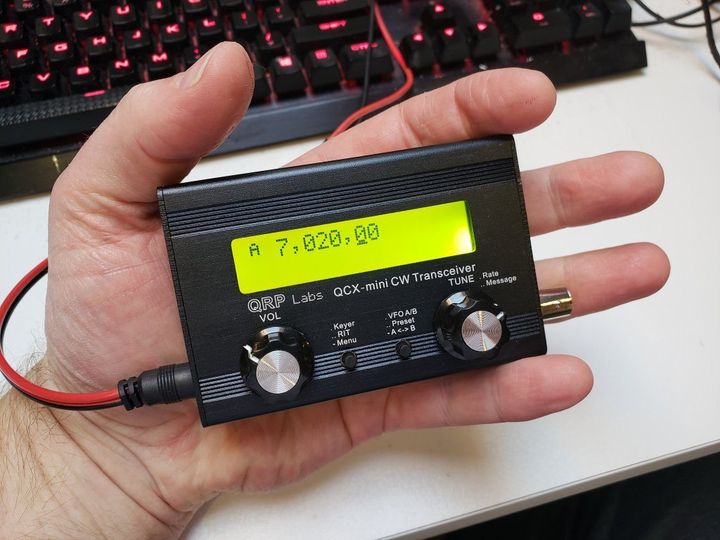
I’ve had the QCX Mini, a product of QRP Labs, a few weeks now, and I’m absolutely amazed at how well this radio works. It weighs less than half a pound, and can easily be held in the palm of your hand. It’s available for multiple bands, but I chose 40 meters, which is almost always open to somewhere, day or night. Winter Field Day is, in addition to being a fun activity, an exercise in emergency preparedness, and this tiny rig is one that you could carry with you anywhere. You just need to plug it into a key, headphones, power supply, and antenna. It’s an excellent CW transceiver, and in many ways, it’s comparable with even the best stations.

The receiver is possibly a little less sensitive than a full-size receiver at home, but it’s more than adequate for QRP use. My best DX with it so far was Austria, I was able to pull in the other station’s signal, and he was able to hear me. Additional sensitivity wouldn’t really add much.

It is, however, extremely selective, and has a narrow filter which is ideal for CW. The downside is that the filter is an analog filter permanently wired in, so it’s really not possible to copy AM or SSB signals. You can hear them, and make them out to some extent, but not very well. For example, the receiver is able to tune to both 5 and 10 MHz, and I can hear the beeps from WWV, but can’t really copy the voice messages.

In addition to the transmitter and receiver, the little radio has a built-in keyer, and even a code reader. The code reader doesn’t work quite as well as the one between my ears, but it actually does come in handy. Occasionally, I might miss a letter, but there it is, right on the screen. And if I forget a call sign before writing it down, it’s there on the screen for a few seconds until it scrolls away.

I haven’t tried it out yet, but the QCX Mini also contains a WSPR beacon that might be fun to play with.  You can read the QST review of the radio at this link.

If someone wants to get into amateur radio very cheaply, and they’re willing to learn Morse Code, the QCX Mini would be a very inexpensive way to start.  Completely assembled, it sells for about $120.  Of course, knowledge of Morse code is necessary, but the code reader makes the learning curve a bit easier.  As long as the station you’re working is sending reasonably good code, the built-in reader will help you catch all or most of what you might have missed.  Even if you’re a little unsure of your abilities at first, you can get on the air right away, and build your speed up on the air, rather than having to worry about “practicing.”

In kit form, the radio is only $55, although you probably want to spend an additional $20 for the case.  (But it would work fine with the printed circuit boards exposed.)  If you get the models for 80, 40, or 15 meters, only a technician class license is required, and that can be done with a weekend of study (perhaps using the study guide I authored).

Winter Field Day Summary

326990256_846822686428782_4363993949095429185_nThe contest incentivizes operating away from home, so I decided to trek a bit further than my own back yard.  I toyed with the idea of just sitting in a folding chair outside, but the temperature was only 5 degrees Fahrenheit, so I opted to sit inside the car for a little protection from the elements.  I found an almost-empty parking lot at Como Park in St. Paul, MN, and decided to operate for a couple of hours from there.

The 40 meter band is best during nighttime hours, but I wanted to avoid sitting in the dark as much as possible.  So I arrived at about 4:00 PM local time, and stayed until a little after 6:00.  Most of my time there was in daylight, but with very good band conditions.

My antenna was an inverted-vee dipole.  The center was held up with my trusty golf ball retriever shoved into a snowbank next to the car, and the ends were tied to the ground.  Normally, I just pick up a stick off the ground and use that as a stake, but when I got there, I realized that all of the sticks were buried under two feet of snow.  A search of my car found a water bottle, which I pushed into the snow to serve as an anchor at one end, and my windshield scraper, to which I tied the other end.  The antenna, made of cheap speaker wire, was up in about 10 minutes.  Since I was in my car, I just plugged the radio into the lighter socket.  But I would normally run it with my fish-finder battery.  In fact, the radio will work just find on as little as a 9-volt battery, although I’m guessing one battery would last less than an hour or so.  A better compromise for small size but reasonable battery life would be 8 AA batteries or 8 D cells.

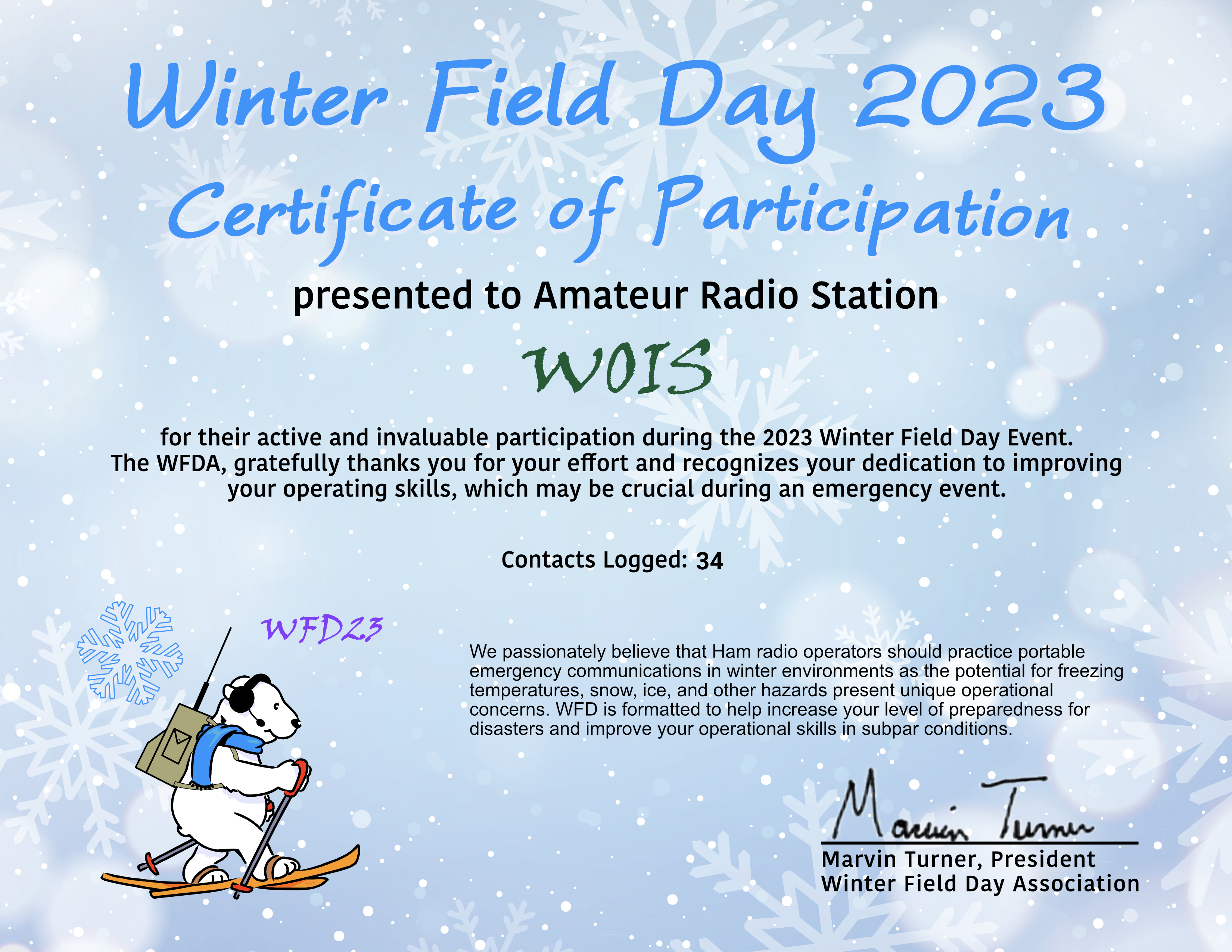
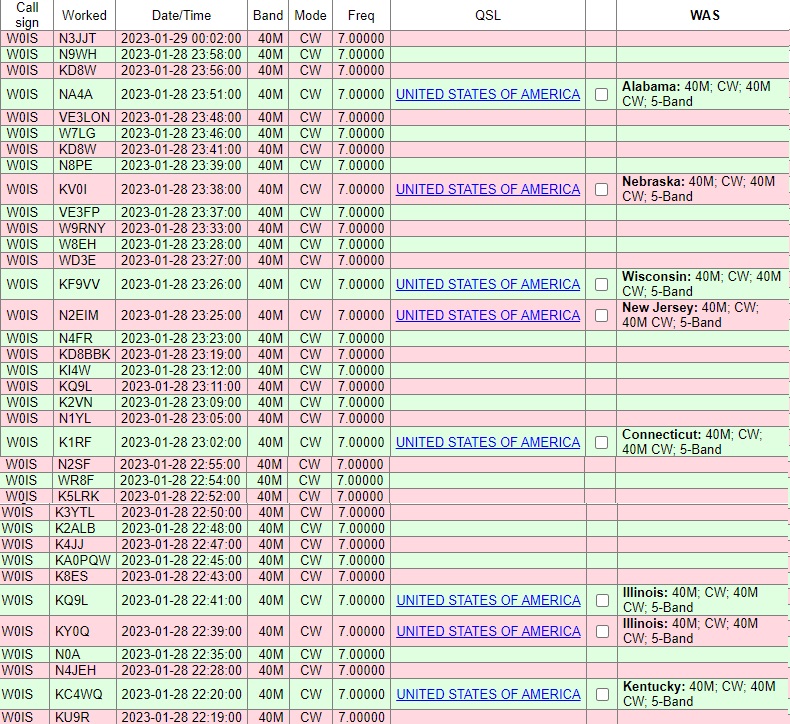
generateCertificateAs soon as I turned on the radio, it sprang to life, and I made a total of 34 contacts over the course of two hours.  You can see from my log below, the radio does get out.  The log image below was made shortly after the contest and confirmations continue to trickle in, but other states worked included Texas, Louisiana, New York, and Pennsylvania, as well as Ontario, Canada.  Surprisingly, I worked nothing to the west, but there are a couple of explanations.  Forty meters is primarily a nighttime band, and it was still daylight to the west of me.  Also, the antenna had an east-west orientation, meaning that it would get out the best to the north and south, which explains the good signal into Texas and Louisiana.

WFDLog2023


If you see your call sign here, thanks for the contact.  And if you don’t see your call sign here (or if you don’t have a call sign yet), I look forward to seeing you on the air next year!  Maybe by then I’ll try out QRP Labs’ QDX digital transceiver.   Starting for just $69, it’s a multi-band digital transceiver.  It plugs into your computer, and you can immediately start bouncing your signals off the ionosphere into other states and countries.  If you get the entry-level technician license, you can use it immediately on 10 meters.  While that band is very hot right now, that’s not always the case.  Therefore, I would recommend also taking the test for the slightly more  difficult general class license.  But you’re in luck, as I’m also the author of a study guide for that test.


Some links on this site are affiliate links, meaning this site earns a small commission if you make a purchase after following the link.

Product Review: Justin Case Car Emergency Kit

326466552_964154944991438_2065030262964904119_nBottom Line:  Better than Nothing, The Price is Right, and Free Roadside Assistance.

If you’re looking for a rudimentary set of emergency gear to toss in your car, this one is by no means the deluxe version. But the price is right (click this link to see it on Amazon), and it’s all certainly better than nothing. It won’t take care of all of your emergency needs, but it might help if you’re in a tough situation and nothing else is available. Santa Claus brought me one, and I’m honoring him by putting it in my car.
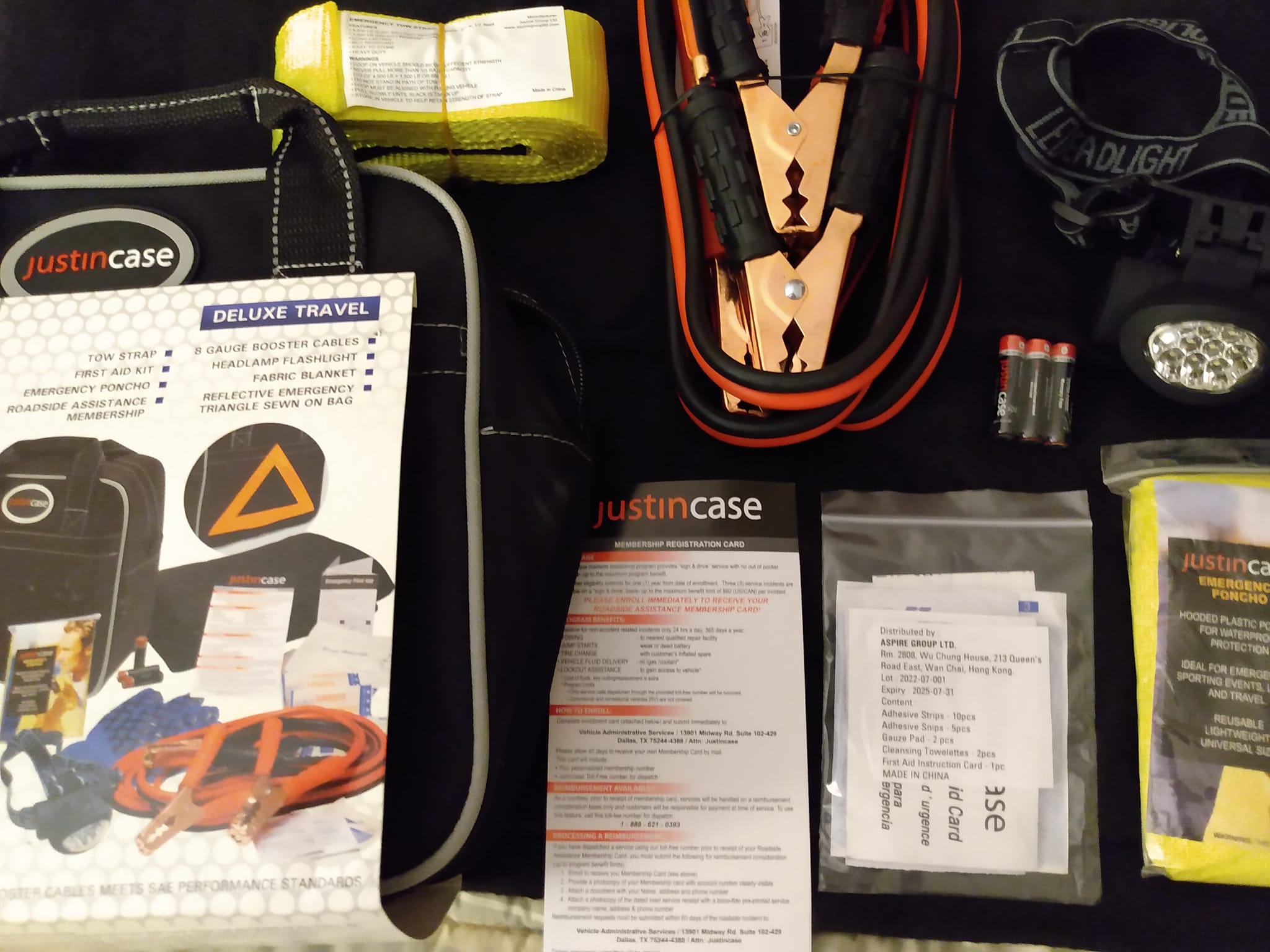
The two biggest pieces of gear are the jumper cables, and a tow strap. The jumper cables look good, but it’s hard to tell how thick the conductors are under the thick insulation. Chances are, they’re much smaller than they appear. But if you have a dead battery, and someone willing to give you a jump start, they’ll probably work, although you might need to let your battery charge for a little while.

The tow strap is 12 feet long, and says that it has a 1500 pound working load. If your car is hopelessly mired in mud, that’s probably not good enough. But if it’s slightly stuck in snow, maybe applying 1500 pounds might get it out. Again, it’s better than nothing. (But I would make sure that nobody is standing near it when in use. If it snaps under 1500 pounds of load, I bet it would sting if it snapped you.)

The set also includes a little first aid kit (no more than a few bandages), a headlamp, complete with AAA batteries, a thin but serviceable blanket, a set of cloth work gloves, and a cheap rain poncho. It comes in a fairly durable looking carrying case, which sports a reflectorized triangle to mark your car in case of emergency.

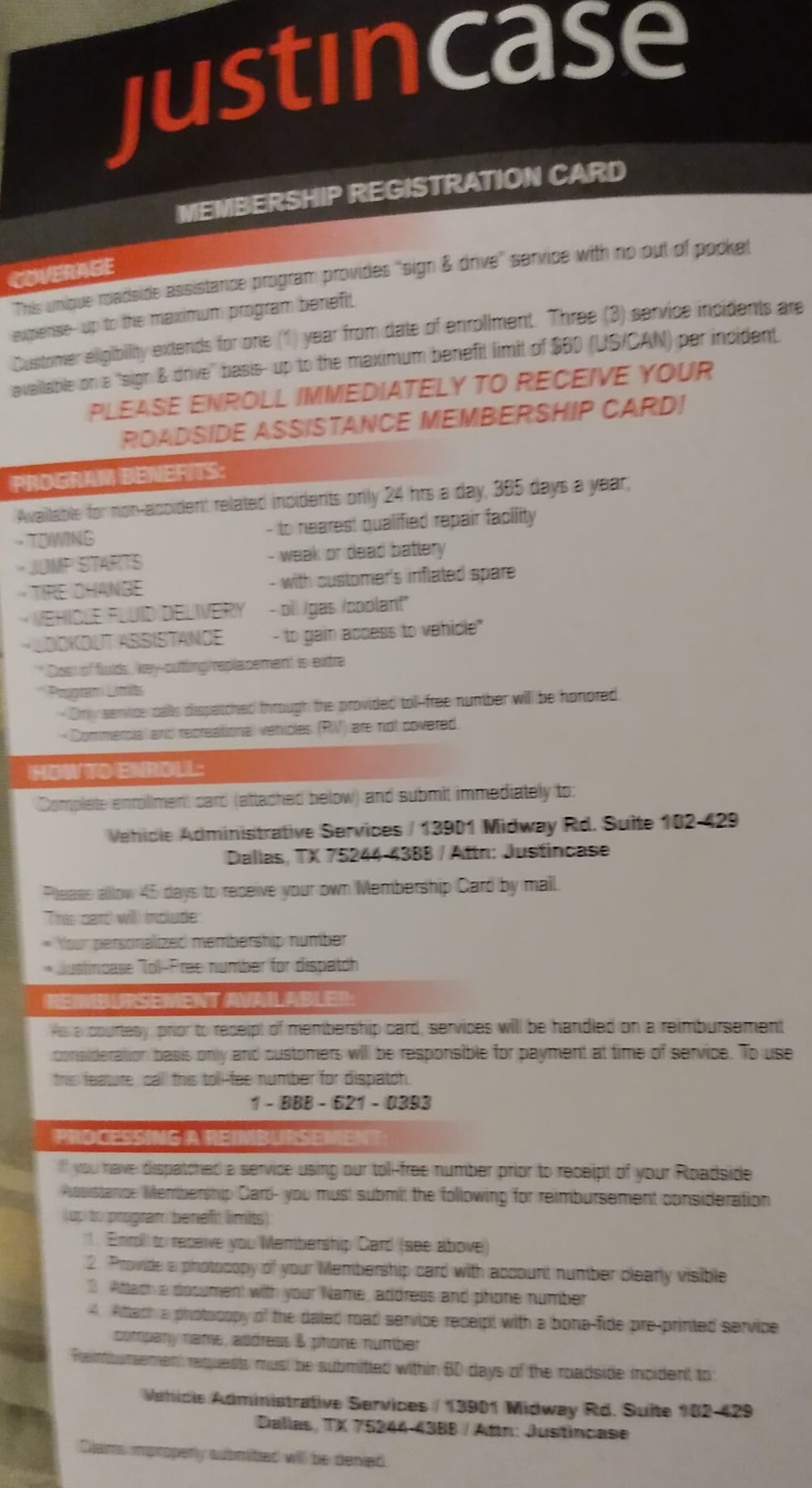
JustincasePossibly the best value, though, is an automatic membership in a roadside assistance plan, named, like the product itself, Justincase. It purports to be a AAA-style assistance plan. After sending in the card that came with the kit, you can call a toll-free number, and they’ll come out and provide roadside assistance at no cost. A card is included, which you are directed to send in care of Vehicle Administrative Services of Dallas, TX.  If you want to read the fine print of the details of the plan, click the image at left for a full-size image.

The card asks for your name and address, as well as the vehicle description and VIN. It doesn’t ask for credit card numbers or anything, so it doesn’t look too risky. We already have AAA, but it won’t hurt to have a second number available to call in an emergency. Again, I have some doubts, but the price is right. And it looks like it’s better than nothing.

Update:  I sent in the card to sign up for the roadside assistance, but after a few months, I never heard anything back.  I wasn’t really counting on it, but I wouldn’t buy this kit for that reason.

Of course, while better than nothing is, well, better than nothing, if you’re going to be out and about in your car, you should have more supplies at the ready.  See our earlier post for a suggested kit for food and heat.  But it won’t hurt to supplement those supplies with the Justin Case Car Emergency Kit


Some links on this site are affiliate links, meaning this site earns a small commission if you make a purchase after following the link.

Book Review: War Diaries by Volodymyr Gurtovy

My friend Volodymyr “Wlad” Gurtovy, US7IGN, has published a book about his experiences living in Kyiv, Ukraine, in the middle of a war. Wlad, like me, is an attorney, and lived a middle-class existence similar to mine, until Russia invaded eastern Ukraine in 2014. He and his family then relocated to Kyiv, but with Russia’s 2022 invasion, he was once again in the middle of the war. His wife and teen son and daughter evacuated to Poland, where they were able to find an apartment, thanks in part to the generosity of friends in America and elsewhere.


He remained behind, partly because he was prohibited by law from leaving, but mostly because he felt the need to stay behind and defend his native land.

The most compelling part of his book is his account of the mundane details of life in the middle of a war. Wlad lives in a fifth-floor apartment building in the middle of a city of 2.8 million (prewar population). Some days, the supermarkets are open, and some days they are not. The mail continues to go through, but some days, it’s too dangerous to go to the post office to pick it up.  Power, water, and heat are sometimes turned on, but they’re often unavailable. When he needed dental work, he was surprised to find the dental office near his home open, staffed by dental students.  There are even a few accounts of his visits to court on behalf of some pro bono client.  To me, the descriptions of how he navigates this dystopia are fascinating, especially since his life prior to the war wasn’t too different from mine.  Many who follow this blog have an interest in emergency preparedness, and I’m sure they will also find this book compelling.

Of course, since Wlad is a ham, radio is a main character in the story. He gets much of his information from the broadcast radio, and one of his main roles has become that of radio repairman so that others can remain in touch when their radio has problems. He also recounts listening in directly to Russian pilots and both Russian and Ukrainian troops.

As the title suggests, it’s written in chronological format, and you’ll have a hard time putting it down, wondering what’s going to happen the next day.

The book is available at Amazon, as a paperback, hard cover, or Kindle.

If you feel moved to provide additional assistance to Wlad’s family, please see our crowdfunding campaign to help with their needs at GoFundMe or GiveSendGo.


Some links on this site are affiliate links, meaning t this site earns a small commission if you make a purchase after using the link.

Combination Handwashing Sink/Toilet Tank

Sinktwice

A basically good idea for some situations, but with some serious limitations

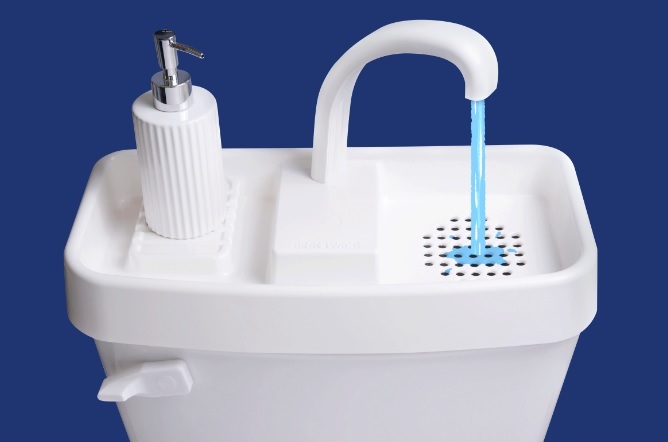
More than once, I’ve seen a meme extolling the virtues of a product similar to the one shown here. The accompanying text is usually along the lines of:

In Japan, a sink is built above the toilet tank for hand washing. The water drains into the toilet tank to be used for the next flush, and saves millions of gallons of water each year.

This is usually followed by many gushing comments stating what a great idea it is.  Along the way, it usually turns into a discussion of how stubborn Americans refuse to adopt this idea, or that a conspiracy by the Big Toilet Companies has suppressed the idea. Invariably, when I point out the disadvantages, everyone wants to argue with me, although nobody actually wants to buy one, even though they are readily available.

It’s actually not a bad idea, and there are certain niche applications where it could really come in handy. For example, if you wanted to install a toilet in a room that simply did not have room for a sink, it would be a good choice.

The people who take a strong position about what a good idea this is often don’t seem to understand exactly how it works, and their comments often reflect their confusion. When you flush a toilet, the water to flush is expelled from the tank, and runs through various pathways in the porcelain and into the bowl. Simultaneously, the tank starts refilling with water for the next flush. This product runs that refill water through a faucet on top, through a drain, and into the tank. So in the minute or so that the tank needs to refill, the little faucet on top of the toilet is running. It uses the same amount of water as any other flush. But since it’s now running outside the tank, if you want, you can wash your hands with it. Again, this is an excellent idea, and probably has some niche applications.

But there are a few problems, and depending on your solution to these problems, you might cause more environmental problems of the type you were hoping to solve.

First of all, in most parts of the country (other than areas with very high humidity), you flush the toilet with cold water. But most people wash their hands with hot water. There are two solutions to this problem. Interestingly, one viable solution is to simply resign yourself to the use of cold water. The CDC in its wisdom, for example, provides handwashing instructions calling on you to “wet your hands with clean, running water (warm or cold)” before applying soap.

However, most Americans probably prefer the familiar warm water when washing hands. So the other alternative is to connect the toilet to the warm water, instead of the cold. But this means that every time the toilet gets flushed, you are heating up 2.5 gallons of water, whether or not you wash your hands. And even if you wash your hands every single time, you use much less than 2.5 gallons in the process. So the net effect is that by making this change, you are unnecessarily heating up a lot of water, which you will literally flush down the toilet. That doesn’t sound like a very “green” thing to do.

Another potential problem is buildup of dirt or soap scum in the rim jets of the toilet. When you flush the toilet, water goes through various pathways in the porcelain, and into the bowl. Some of these, particularly the rim jets at the top of the bowl, are rather small. They are designed to have clean water run through them, and it seems to me that if you run grey water through them, there’s a potential for them to get clogged up.  (And of course, if anything else ever gets poured down the drain, it runs the risk of clogging those little openings.)

It is possible to clean the jets, at least to some extent, by getting down on your hands and knees in front of the bowl, and reaching in with a small brush. But since most of the water’s path is buried in the porcelain, it seems to me that there’s a potential for clogging in an inaccessible area. Of course, you can probably clean them by pouring in toxic chemicals, but if the whole point of this exercise was to “go green,” that doesn’t seem like a good alternative. And if you have to eventually replace the toilet, sending the old one off to the landfill doesn’t sound like a particularly environmentally sound thing to do.

Another issue is washing your hands other than after using the toilet. The only way to get the water to flow is by flushing the toilet. So whenever you want to wash your hands for any reason, you must either find another sink, or else send 2.5 gallons of water literally down the drain. Also, if you are in the middle of washing your hands, but you didn’t quite finish rinsing, you have no choice but to send another 2.5 gallons of perfectly good water into the septic system.

The final issue is that the tank isn’t located very conveniently for washing your hands.

Despite these issues, this is actually a rather good idea, as long as you understand these limitations. If you can live with these downsides, you’ll be glad to know that the Big Toilet Companies are not suppressing this invention. Indeed, like anything else, you can get them at Amazon.

There are a few different brands.  Some are plastic, and some are ceramic.  And more importantly, they come in different sizes, so find the one that fits your tank.  You can find them at this Amazon search result.


Some links on this site are affiliate links, meaning that this site earns a small commission if you make a purchase after clicking the link.

Product Review: Great Value Pulled Pork in BBQ Sauce

PulledPork3CarSurvivalKit

Bottom Line:  Relatively expensive, but good way to add some variety to your survival kit.

We’ve previously reported about the importance of a car winter survival kit, to make sure you have enough food in the car to keep yourself reasonably comfortable if stranded. Recently, for example, a winter storm stranded motorists on Interstate 95 in Virginia for over 24 hours. As we showed previously, the kit in our car contains mostly dry food, and we have water and a means of cooking in the car.

One item that was lacking from the original kit was meat, or any type of protein for that matter. I corrected that after Christmas by buying a Hickory Farms meat and cheese gift package at a steep after-Christmas closeout discount, similar to the one shown at right.

PulledPork2Another item recently caught my eye, and that was the pouch of Great Value Pulled Pork in BBQ Sauce from Walmart. Its already cooked, so it only needs to be warmed up. Of course, in an emergency, it could be eaten cold. It’s best on a bun, but any kind of bread or crackers would work fine.  You could also eat it right out of the pouch, or together with one of the other dishes in the survival kit, such as the rice or mashed potatoes.

To test it at home, I was originally going to heat it up in the microwave, but I realized that I should just warm it up as I would in the car. Since I have in the survival kit an emergency stove and a pan, I decided to duplicate this at home. To keep from getting the pan dirty, I heated up water and simply placed the pouch in the water. Of course, in an emergency, if water is short, you can still use the water for drinking or cooking. More likely than not, if I had to heat it up in the car while stranded, I would be using melted snow.

The finished product was better than I expected. It made a reasonably filling lunch, and in an emergency, a hot sandwich (or even just hot meat out of the pouch) would seem luxurious.

This product wouldn’t be viable for a large portion of your emergency food storage. The 2.8 ounce pouch cost $1.28. It provides 11 grams of protein, and only 130 calories. By contrast, a jar of peanut butter, for only a little bit more money, provides 2520 calories and 98 grams of protein. According to Harvard University, the recommended daily protein intake is 0.36 grams per pound. So a person weighing 150 pounds should get about 54 grams per day. This means that for long-term storage, the peanut butter is a much better value. But for a day or two, the pulled pork would add a few calories to your diet, provide a welcome hot meal, albeit a small one, and provide you with some protein. And it’s quite possible that the contents of the car witner survival kit will be frozen when you need them. Thawing a pouch of meat is probably a lot easier than figuring out how to thaw a jar of peanut butter.

The package I bought had a “best by” date of November 2024, almost three years in the future. So I’ll definitely be tossing some in the car survival kit. I hope I don’t have to use them until a future family survival picnic.

Incidentally, if the package looks familiar, that’s because this type of packaging is also used for tuna, another possible choice for the survival kit.



Some links on this site are affiliate links, meaning this site earns a small commission if you make a purchase after clicking the link. However, the Walmart link above is not an affiliate link.

Which is Cheaper: Gasoline or Ethanol?

ethanolmolecule

Gasoline versus Ethanol

Shown above is a molecule of ethyl alcohol, also known as ethanol.  If you ignite it with a spark, it will burn. This is not rocket science.  (Come to think of it, though, if you use it as rocket fuel, then it is rocket science.)  Gasoline (or petrol, as our friends across the pond like to call it) is a mixture of molecules, most of which look very similar to the one above. If you ignite it with a spark, it will also burn. The difference, however, is the “O“. Gasoline doesn’t have any oxygen atoms. To burn it, you need to supply all of the oxygen from another source. Fortunately, that’s easy to do, since we live in an atmosphere consisting partly of oxygen, and it’s free for the taking.

But this means that for a given amount of fuel, the ethanol will have less energy content: If you burn gasoline, you can use the free oxygen that is floating around. If you use ethanol, then you are paying for some of the oxygen, which you could have gotten for free.

For this reason, I’ve heard many people explain that you shouldn’t use ethanol as fuel, because your fuel mileage will be lower. But that’s not the end of the discussion: If you’re like me, you are really concerned about saving money, and your main concern is which fuel is cheaper.

A Real World Comparison Test

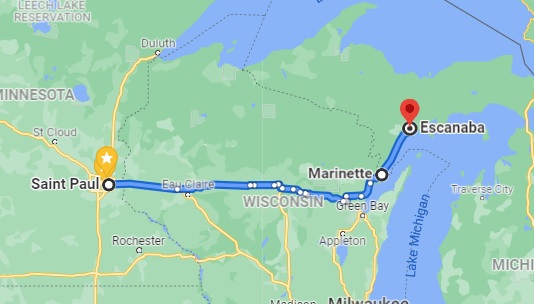
MSPEscanabaI’ve heard many persons express their opinion as to the relative fuel economy, but I’ve never heard anyone actually test it, so I decided to do so myself. I recently had to drive from St. Paul, MN, to Escanaba, MI, to do an FCC Great Lakes Ship Radio Inspection. I drove eastbound using e85, a mixture of approximately 85% ethanol and 15% gasoline, and drove westbound with gasoline (which is actually e10, 90% gasoline and 10% ethanol). For the nitpickers, here are the conditions of the test:

To make sure I was able to purge almost all of the E85 from the system before the return trip, I tested the mileage from St. Paul, MN, to Marinette, WI, short of my final destination. I started with a full tank, and upon arriving in Marinette, I checked the cumulative mileage and then added about 6 gallons. I also added a few gallons in Escanaba, MI, about 56 miles away. When I arrived back in Marinette, I was down to about a quarter tank, at which point I filled with gasoline (actually, e10) for the trip home. So almost all of the e85 had been purged from the system for the trip home.

My vehicle is a 2014 Dodge Journey with the 3.6 liter 6 cylinder engine. The EPA estimated highway mileage is 25 MPG with gasoline, and 18 MPG with e85. The two endpoints have similar elevations (795 feet in St. Paul, versus 594 in Marinette). Winds on the day of my trip were light, and whenever I did see flags moving in the breeze, the prevailing wind seemed to be from the north. So there should be no effect from a headwind or tailwind. I took an identical route both directions, mostly over four lane freeways, but a small portion over county highways suggested by Google. In other words, the driving conditions both directions were more or less identical. The average mileage reading was taken from the car’s computer, which was reset after each fill-up.

The average mileage using e85 was 21.6 MPG. The average mileage using gasoline (actually e10) was 26.4 MPG. As noted above, the mileage with ethanol was lower, since the fuel has a lower energy content. The real question is which fuel is cheaper.

To make the comparison fair, I’ll use the prices at the same station, the one where I bought the e85: The e85 cost $2.229 per gallon. In other words, it cost me $2.229 to drive 21.6 miles, or 10.32 cents per mile. (I actually used a loyalty card, which brought the cost down to $2.029 per gallon, or 9.4 cents per mile).

The gasoline I bought for the return trip cost $3.239 per gallon, since one gallon allows me to drive 26.4 miles, that means I spent 12.3 cents per mile. But in fairness, if I had bought that gas for the eastbound trip at the same place where I bought the e85, it would have cost $3.099 per gallon, which works out to 11.7 cents per mile.

In other words, it was cheaper to drive using the e85: 10.3 cents per mile versus 11.7 cents per mile. In other words, the e85 is 12% cheaper than using gasoline.

It should be noted that these figures are based upon the price at one particular station, a Holiday gas station.  You can view the current prices at this station at this link.  Some gas stations sell e85, but at a much smaller discount over the price of regular gasoline. In fact, I’ve occasionally seeing a station inexplicably selling e85 for more than the price of regular gasoline. Obviously, it makes no sense to buy to buy there. To be economical, the price of e85 needs to be below 21.6/26.4 = 82% the price of regular gas. In my case, the price of e85 was 74% the cost, and thus a clear bargain.

Other Considerations

There are a couple of other factors to keep in mind. Even though the name of the fuel is “e85” the exact blend can vary. During the winter months, the gasoline content is higher, and I have noticed that stations do not adjust the price based upon the exact mix. So during the winter, the e85 might be an even greater bargain.

Also, I have not measured it, but I have noticed that when I have a mixture that is around 50% ethanol and 50% gasoline, I don’t notice much mileage difference between it and 100% gasoline. So even though the energy content is lower, the actual effect on mileage might not be linear. It would be interesting to repeat this experiment with different blends.

I’m not sure of this, but I suspect that for applications requiring more power (such as towing), gasoline would have a greater advantage. But again, I’ve not tested this hypothesis.

And you will certainly have more range using gasoline than you would ethanol. So if cost isn’t an issue, but you need to drive as far as possible before refueling, then you will be able to drive 22% further by using gasoline.

I suspect that ethanol might have a greater cost advantage for high altitude driving. The reason why there is a lower energy content is because the fuel contains oxygen, which is available at no cost from the atmosphere. At higher elevations, the additional oxygen in the fuel might be an advantage.

Precisely because it has a lower energy content, ethanol also increases the octane rating of the fuel, so it is an inexpensive option for use in high compression engines.

Ideas for Young Scientists

If students are looking for an interesting science fair project, I hope my little experiment has given you some ideas. Even if you don’t have a driver’s license, you can recruit your parents to keep track of mileage when driving, and compare different fuels, or different types of driving, to see which is the most economical.

Interestingly, I exceeded the EPA mileage estimates for both fuels. There was a time when the EPA estimates were overly optimistic, but I guess those days are gone.

But Ethanol Will Clog My Fuel Filter!

Someone will invariably claim that ethanol clogs fuel filters, and I want to explain what is really happening.  Alcohol can mix with both water and gasoline.  Water, by itself, cannot mix with gasoline.  If you have 100% gasoline in your tank and some water is added, it is heavier than gasoline and will settle to the sump at the bottom of the tank, which is below the point where it can be drawn out by the fuel pump.  It doesn’t do any harm there, as long as it stays below the level of the fuel intake.  But it does dissolve dirt, and that dirt has nowhere to go but stay in the water.

Eventually, if water keeps getting added, it will continue to collect.  If it ever gets up to the level of the intake, then this will be a problem, since water mixed with dirt will be going to the engine rather than gasoline.  The fuel filter will clean out the dirt, but the engine will try to burn the water, and water doesn’t burn.

When ethanol was first added to gasoline in the U.S., this meant that it found its way, for the first time, into cars with water in the bottom of the tank.  The alcohol allowed the water and dirt to mix with the gasoline.  The dirt, which may have collected since the car was new, went into the fuel filter, as the filter was designed to do.  This is how ethanol got a reputation for clogging fuel filters.

But now, virtually all gasoline sold in the U.S. contains at least 10% ethanol, and virtually every car on the road has been burning 10% ethanol for years.  Water never gets a chance to build up in the tank.  If there is dirt in the tank, it comes out constantly.  Unlike the time the car got its first tank of ethanol, years’ accumulation of dirt is not coming out all at once to suddenly clog the filter.  So after that initial shock, ethanol actually corrects the problem, and also prevents gas line freeze.  In the days before ethanol fuel, in cold climates, people bought a product called Heet to prevent fuel line freezing.  This consisted either of ethanol or isopropyl alcohol.  Since ethanol is now included in the fuel, this is no longer necessary, and you rarely hear of gas lines freezing.


Some links on this page are affiliate links, meaning that this site earns a small commission if you make a purchase after clicking the link.