Author Archives: clem.law@usa.net

1922 3-Tube Portable Receiver

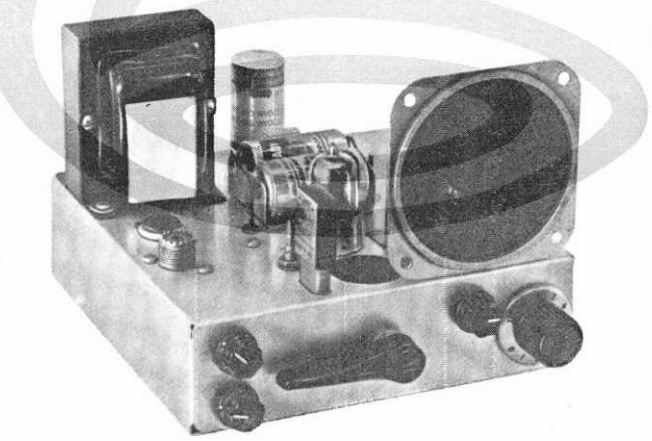
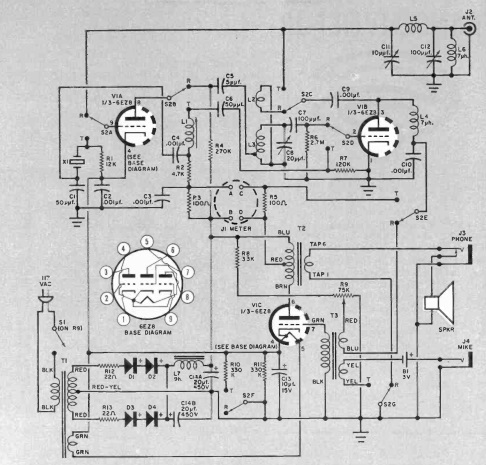
1922JuneSciInvA hundred years ago this month, the June 1922 issue of Science and Invention carried the plans for this vacation-time radio receiver, by the magazine’s radio editor Robert E. Lacault.

The accompanying article points out that the real radio fan couldn’t conceive of a vacation without a radio set. Ever since the author first listened to a radio signal in 1910, he had never failed to carry some sort of radio set on vacation. The latest was this compact and efficient set.

The three-tube regenerative set tuned 180 to 500 meters (600 to 1670 kHz), which at the time covered both broadcast and amateur frequencies. The author reported pulling in amateur signals from 200 miles away, and being able to hear broadcast stations quite clearly for almost 100 miles.

While an ordinary antenna could be used, the set shown here had an integrated loop antenna which could be quickly put into service. Either dry cells or storage batteries could be used for the A and B batteries.


Using Your Cell Phone In An Emergency

wea-phones-01-s
Quick Links

I recently received a request from Verizon to link to their Using Smartphones in an Emergency page. In an emergency situation, whether it’s a hurricane, earthquake, or any other natural or manmade disaster, you phone can be an invaluable tool, and that page is certainly worth a read.

As most of the readers of this page are aware, your cell phone has definite limitations in an emergency. If you don’t have cellular service, or at least WiFi, then, of course, you can’t make or receive calls, send or receive texts, or use anything involving the internet. For that reason, as most of our readers are aware, you probably can’t rely upon your cell phone as being your sole means of communication.  (To learn more, check out our emergency communications primer.)

However, there are many emergency situations where cellular or WiFi service will be available. If nothing else, you might be able to go to the closest Waffle House and use their WiFi.  And most cellular providers have extremely reliable service, so even in a severe emergency, you very well could still have cellular service.

But more importantly, since you’re probably carrying around the smart phone anyway, there are many functions that it can be used for in an emergency that do not require internet access. In many cases, it’s not the best version of the particular tool that you want. For example, if you anticipate needing a flashlight, then it’s best to get a real flashlight. But if you’re sitting there in the dark with no other source of light, then your phone’s built-in flashlight could be a godsend.

In addition to the uses discussed on the Verizon site, here are some additional uses you might consider.


FM Tuner

Unbeknownst to most users, the vast majority of cell phones sold in the past few years include a receiver for the normal FM broadcast band. This is not an “internet radio” service that picks up stations streaming over the internet. It is an honest-to-goodness FM radio that picks up broadcast stations over the air, internet or no internet. Sadly, this is the only radio that some people own, and most of them probably don’t know that they have it. Even if the internet is down, chances are, at least one FM station in your area will be on the air.

Your cell phone probably doesn’t have a very good antenna built in to it. Fortunately, the receiver is designed to use the headphone cord as an antenna. But my phone (a relatively cheap Motorola e6) is able to pick up a few local stations with no antenna at all. So it’s nice to know that in case of an emergency, I always have with me a method of getting some emergency information. For best results, however, it’s good to have a pair of headphones with you.  You can pick up a cheap pair at the dollar store, so there’s really no excuse  not to be prepared.

My phone came with the FM tuner app installed. Strangely, many sellers don’t include the app, even though the phone’s hardware contains the FM tuner. If you don’t already have the app, this CNET article explains how to download it.


Storing Emergency Information on Your Phone

openbooksThere are undoubtedly better places to store emergency information, and there are undoubtedly better places to read information than your phone. But if you have your phone with you all the time, it’s reassuring to know that you always have survival information with you. The Verizon site discusses the importance of having a copy of your personal documents stored on your phone. But your phone probably has a lot of memory, and it would be a good place to store other documents.

One good document to have, since it provides information useful for many emergencies, is Nuclear War Survival Skills. It’s available for free download at many sites, including this link. The PDF at that link is 18.9 MB, and it’s likely that most phones have plenty of free memory to save it. Reading it on a cell phone probably isn’t an ideal method, but if you need this lifesaving information in an emergency, it’s certainly better than nothing.

At my website, I have links to other free emergency preparedness books.  If there is any information you believe you might need in an emergency, downloading a copy to your phone is cheap insurance.

If your phone has a lot of storage available (50-100 GB), you might consider downloading the entire English-language Wikipedia. You can find instructions for doing so at this link.  (And for more information, see my website.)


Radiation Detector

Your phone’s camera is sensitive to visible light, which is what makes it a camera. But it’s also sensitive to gamma radiation. This means that the hardware can be used as a radiation detector. To make that happen, you can install the free GammaPix Lite app, or the full GammaPix app for $14.99.

To use the app, you need to cover up your phone’s camera with electrical tape to keep the light out. When you do, any incoming pulses are gamma rays, and the app can measure them.


Having a Spare Phone

In the United States, any cell phone, whether or not its owner has paid for service, is capable of making calls to 911. And, of course, the old phone will continue to work just fine on WiFi, and all of the non-internet apps discussed above will also work just fine. Therefore, if you purchase a new phone, it’s a good idea to keep your old phone for use in an emergency. Keeping it in the glove compartment of your car is cheap insurance. You’ll want to make sure that you have a car charger that fits your phone.

Also, it’s not very expensive to purchase a phone for use in emergency. You can use it with WiFi, all of the non-internet apps will work, and it can be used to call 911. They’re cheap because they are sold by prepaid cell phone providers as a loss leader, and they expect to make a profit by selling you the airtime. But there’s no need to ever activate them, so for a small initial investment, you can purchase a brand new phone which can be used in emergencies. Here are some examples of inexpensive prepaid phones:

In most cases, these prepaid phones are locked, but that means only that you can’t use them with other cellular providers. You can use them for 911 calls, with WiFi, and with all of the apps shown here.  This type of phone is often called a “burner” phone.  Essentially, it’s so cheap that you can just burn it out without caring.


Keeping Your Phone Charged

It should first be noted that many uses of a cell phone are very battery intensive. So if you have alternatives, you should use them. For example, if you are listening to a local radio station via streaming audio, this is very wasteful of your battery. You would be much better off using a separate radio, which draws considerably less electricity. But no matter how much you conserve your phone’s battery, eventually, you will need to charge it.

And if the power is out, then this keeping your phone charged can be challenging. If you have a car, then the easiest way to do so, is to plug it in to the car. A car with a full tank of gas, if used only to charge your phone, will probably last months or even years. Of course, you’ll need a car charger appropriate for your phone.

If you don’t have a car, or don’t want to go out and keep starting it, then a solar charger of the appropriate size can keep your phone charged more or less indefinitely. In general, the larger units can keep a phone charged indefinitely, while the smaller pocket-size units won’t be able to keep the phone fully charged, but they can be used to keep it topped off. There are a wide variety available, such as these:

Also, keep in mind that in some cases, you might have normal AA batteries, or be able to buy them. If so, the charger shown here can be used to charge your phone with normal AA alkaline batteries.

My personal favorite charger is the one shown at right. First of all, this Midland unit is a radio, weather radio, and flashlight, so when you need these devices, you don’t need to use the battery in your phone. But it can also be used to charge your phone, using either the hand crank or the built-in solar panel.

For more information, see our Preparing For Power Outages Page.


Some links on this site are affiliate links, meaning that this site earns a small commission if you make a purchase after using the link.

1942 Airplane Detector

1942JuneRadioCraftCoverEighty years ago this month, the June 1942 issue of Radio Craft showed this walking airplane detector, then under development for use by the Aircraft Warning Service. The headset contained a parabolic microphone and headphones. When the operator heard the low-pitch rumbling of a plane, he could turn his body for the loudest sound, at which point he could look for the approaching aircraft with his binoculars.

The batteries and amplifier were contained in a case “smaller than the usual gas mask container.”


Battle of Dutch Harbor, 1942

Today marks the 80th anniversary of the Battle of Dutch Harbor, Alaska. On June 3-4, 1942, Japanese Aircraft attacked the naval base there, resulting in the deaths of 50 Americans.  The battle marked the first ever enemy air raid on the Continental United States.


Taking the Radio Outside: 1942

Screen Shot 2022-05-23 at 9.28.59 AMEighty years ago, if you wanted to play the radio outside, the June 1942 issue of Popular Mechanics showed you this convenient method of doing so.

A small holder was installed under the outdoor table, and the table radio could be placed there for easy tuning.  An extension cord through a convenient window completed the installation.


Free Radio for Selling Newspapers: 1922

A hundred years ago, if you were a kid in South Bend, Indiana, and you wanted to get in on the excitement of radio, then this deal was for you.

All you had to do was sell twelve new subscriptions to the South Bend News-Times (just 20 cents a week for a minimum of 13 weeks), and you would earn yourself a radio receiving machine, absolutely free. This ad ran in the paper’s June 1, 1922, edition.


1929 Grocery Prices

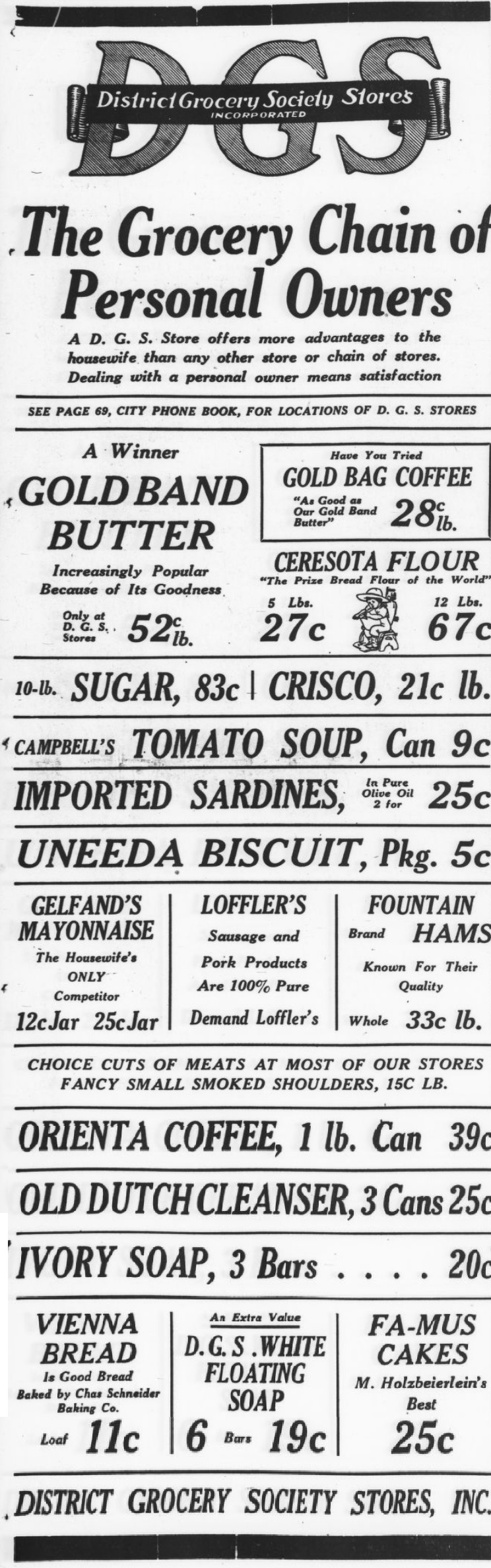
1929May31KrogerFor a snapshot of grocery prices at the end of the Roaring 20s, this ad for Kroger appeared in the Pittsburgh Press on this date, May 31, 1929.  Things were still roaring, since the 1929 Crash was still about five months away.

There’s been a lot of inflation (and some deflation) since 1929, and according to this online inflation calculator, one dollar in 1929 is equivalent to $16.91 in 2022 money. So you need to multiply all of these prices by 16.91 to get the equivalent.

The hams at 29 cents per pound are equivalent to almost $5 per pound today. How does that compare to today’s prices?

Bananas worked out to 93 cents per pound in today’s money. Pineapples (from Cuba) were the equivalent of $2.11. How does that compare to today’s prices?

Sugar, which probably also came from Cuba, was $1.31 for a 25 pound bag. In today’s money, that would be about 89 cents per pound. How does that compare to today’s actual price?

What would you make for dinner if these were your options?


Some links on this site are affiliate links, meaning that this site earns a small commission if you make a purchase after clicking the link.

Dedication of Lincoln Memorial, 1922

Today marks the 100th anniversary of the dedication of the Lincoln Memorial, which took place on May 30, 1922, the traditional date of Memorial Day, or, as it was called then, Decoration Day.

Shown above are Chief Justice and former President William Howard Taft, President Warren G. Harding, and Robert Todd Lincoln, the late president’s son. The Chief Justice formally presented the new monument to the President, who accepted it on behalf of the American people.

The ceremony was broadcast live on stations NOF and NAA.


Duncan Sisters Broadcast, 1921

1922MaySciInv2

Shown here 101 years ago are the vaudeville duo the Duncan Sisters, Rosetta and Vivian. They are shown in the May 1921 issue of Science & Invention at the home of Robert F. Gowen, chief engineer of the DeForest Radio Telephone & Telegraph Company. From the transmitter at his home, the broadcast was heard in Connecticut, Ohio, Arkansas, Illinois, and Washington, D.C.

Perhaps their broadcast performance included “The Baby Sister Blues,” which you can hear on this 1923 recording:


Popular Science: 1872-2022

1972MayPS


This month marks the 150th anniversary of Popular Science, or at least the predecessor of what we know as that magazine. The original magazine, whose first issue was published in May 1872, was a scholarly journal of about a hundred pages, with about ten articles, and just a few illustrations. The rights to the name were acquired in 1915, and the October 1915 issue resembles the modern incarnation of the magazine.

1872MayPSThe first issue contained articles on topics such as the study of sociology, an essay on science and immortality by Rev. T.W. Fowle, the source of labor, Quetelet on the science of man, and disinfection and disinfectants. One of the few illustration is this sketch of the sun’s corona, illustrating an article about the solar eclipse of December 12, 1871.

In April 2021, the paper edition of the magazine ended, and it exists now only in digital format. All issues from 1872 through the early 2000’s are available at Google Books for free reading.

The image shown above is the cover from May 1972, celebrating the 100th anniversary. The magazine used the occasion to publish a review of its first hundred years, and used copies are available at the followng links. As with many used books, prices can vary wildly, so be sure to compare prices at all of these links:

Current subscriptions to the digital magazine are available at the following link:


Some links on this site are affiliate links, meaning that this site earns a small commission if you make a purchase after clicking the link.